
Language: Deutsch · English
 Nuclet: Ticket system (not yet available)
Data sheet and documentation entry point for the Ticket system Nuclet (creating tickets and notifying editors by email).
CONCEPT INTEGRATORS UPDATED: JUL 2026 APPLIES TO NUCLOS 4.2026.X
On this page
Machine-translated – under review
This page was machine-translated from German as a first draft and is currently under review. The authoritative source remains the German original (see the language switch above).
Releases
| Version | Date | Notes | Compatibility |
|---|---|---|---|
| 1.0.0 | September 2017 | First version (in development) | from Nuclos 4.21.0 |
Overview
The "Ticket system" Nuclet offers the ability to create tickets and notify the assignees about them by email. It is possible to categorize tickets by different case types and assign a priority. In addition, file attachments can be sent along, deadlines can be set, and the processing time of the ticket can be recorded.
The "Ticket system" Nuclet already contains the Nuclets Nuclet: Email sending and Nuclet: JIRA Import.
Integration
| Step | Description |
|---|---|
| 1 | If you have not already done so, configure multilingualism in your Nuclos instance. To do so, add two or more data languages (see Managing the data languages). It does not matter which language is the primary language. |
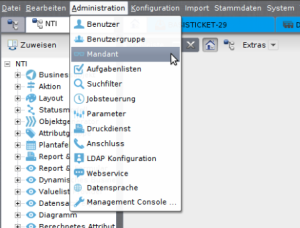
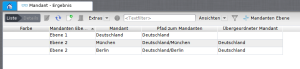
| 2 | Create at least one tenant level:
(For further information on the topic, see Tenant management). |
| 3 | Now import the "Ticket system" Nuclet (see Nuclet import). Note: After the Nuclet import, compilation errors will occur, but these become unnecessary after carrying out steps 4 and 5. |
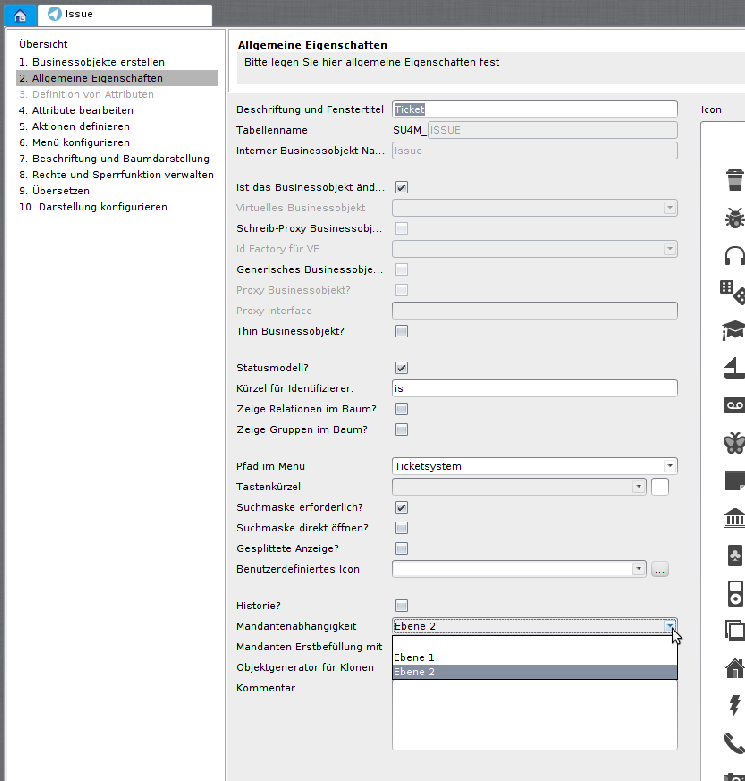
| 4 | Link the business objects "Issue" and "Project" with the lowest level you created (see Business object - General properties).
|
| 5 | Configure the "Email sending" Nuclet (see Nuclet: Email sending). |
6 | Run the job "InitialDataload" manually (see Job control - checking job execution). |
| 7 | Create a parameter named "MANDANT_FOR_SELF_REGISTERED_USERS" and enter as its value the name of one of the lowest mandator levels (here "Berlin" or "München", see step 2). |
Related pages
Überblick
Inhalte