
Language: Deutsch · English
 Nuclet: Email sending
Data sheet and documentation entry point for the Email sending Nuclet (sending emails from Nuclos processes based on templates).
CONCEPT INTEGRATORS UPDATED: JUL 2026 APPLIES TO NUCLOS 4.2026.X
On this page
Machine-translated – under review
This page was machine-translated from German as a first draft and is currently under review. The authoritative source remains the German original (see the language switch above).
Releases
| Version | Date | Notes | Compatibility |
|---|---|---|---|
| 1.1.0 | 13.02.2018 | First published version | from Nuclos 4.25.1 |
| 1.1.2 | 04.07.2019 | Email queue and improved API | from Nuclos 4.33.8 |
| 1.1.3 | 17.12.2021 | E-Mail-Templates | from Nuclos 4.47.3 |
| 1.1.4 | 22.11.2022 | Text blocks: subform data in general and via rule block, dispatch condition for text and attachment blocks | from Nuclos 4.47.3 |
| 1.1.5 | 10.02.2023 | Store emails as file | from Nuclos 4.47.3 |
| 1.1.6 | 04.05.2023 | recurring email reminders | from Nuclos 4.47.3 |
| 1.1.7 | 07.12.2023 | recurring email series, parameter for the current date, dispatch condition for subform Addresses | from Nuclos 4.2023.24.2 |
| 1.1.8 | 11.07.2024 | Log draft as preview for an email, mark attachment as mandatory field, show use of blocks | from Nuclos 4.2023.24.2 |
| 1.1.9 | 16.07.2025 | Display and use Nuclos fields, email series according to schedule list, maximum attachment size, allow locked users | from Nuclos 4.2024.26.2 |
Overview
The Nuclet "E-Mail-Versand" offers additional convenience when using the Nuclos Mail API (see http://api.nuclos.de/org/nuclos/api/provider/MailProvider.html#send(org.nuclos.api.mail.NuclosMail)).
In particular, it enables the redirection of all emails for test purposes or to test environments, as well as the archiving of all sent emails including file attachments for documentation purposes.
In addition, there is a job for sending and receiving emails. This means emails are sent a little later, but can be rolled back after errors so that they are not sent multiple times.
Furthermore, there is also the option to configure templates for emails.
Version 1.1.9
Description of the changes in version 1.1.9
| Topic | Description |
|---|---|
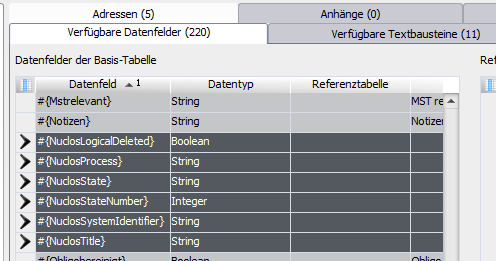
| Display and use Nuclos fields | Nuclos fields are now displayed in the subform Available data fields and can be used in the template texts.
|
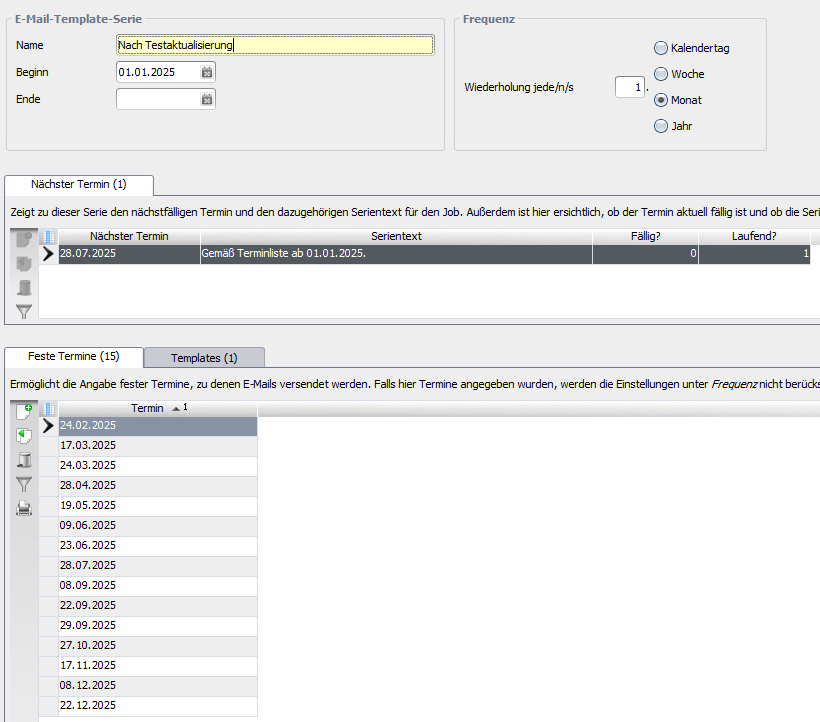
| Email series according to schedule list | Email template series can now also be sent at fixed dates (see subform Fixed dates). The settings under Frequency then have no effect.
|
| maximum attachment size | Via the Nuclet parameter Maximum attachment size the maximum permitted attachment size in MB for dispatch can now be specified (default: "20"). |
| allow locked users | Via the Nuclet parameter Allow locked users sending emails to addresses with a locked user can be allowed (default: "N"). The block Creator (user) returns no result when locked. |
Version 1.1.8
Description of the changes in version 1.1.8
| Topic | Description |
|---|---|
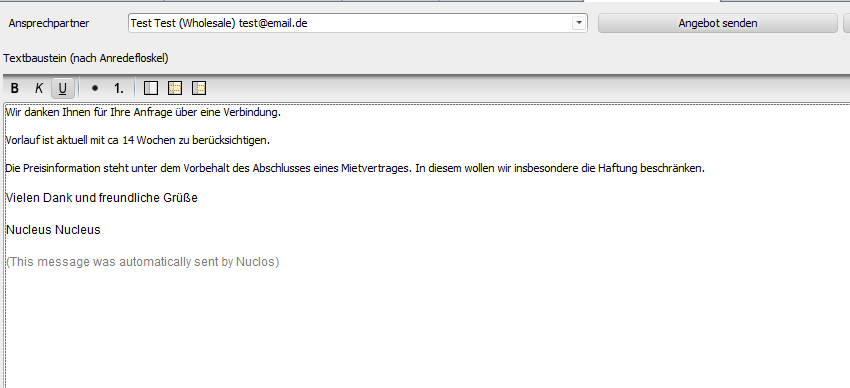
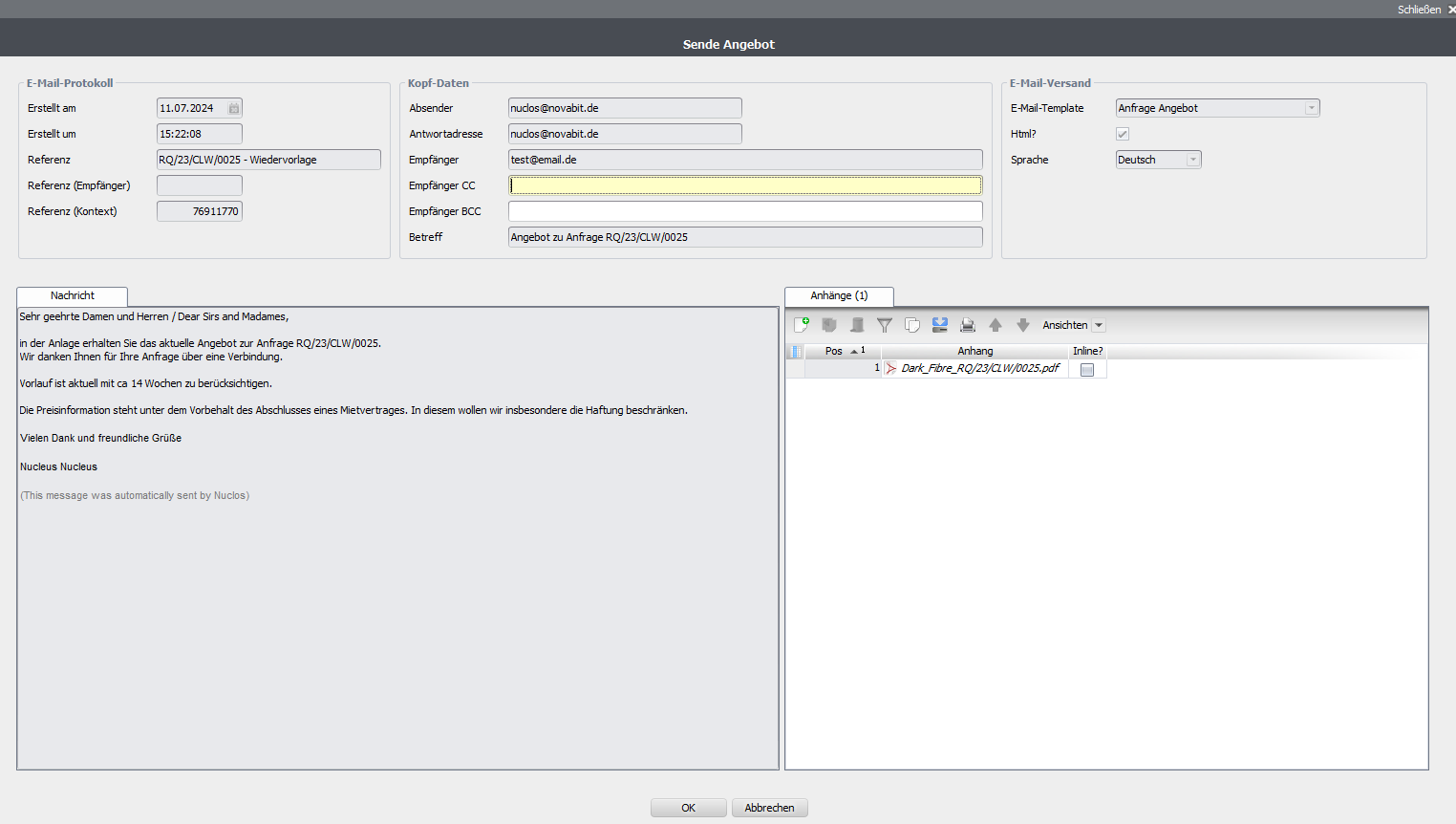
| Log draft as preview for an email | Emails can now be shown to the user as a draft, for example via an object generator. In doing so, an email log is created with the action Entwurf created, which is sent automatically on saving. One use case would be, for example, a quotation that can still be supplemented with specific texts, recipients or attachments.
|
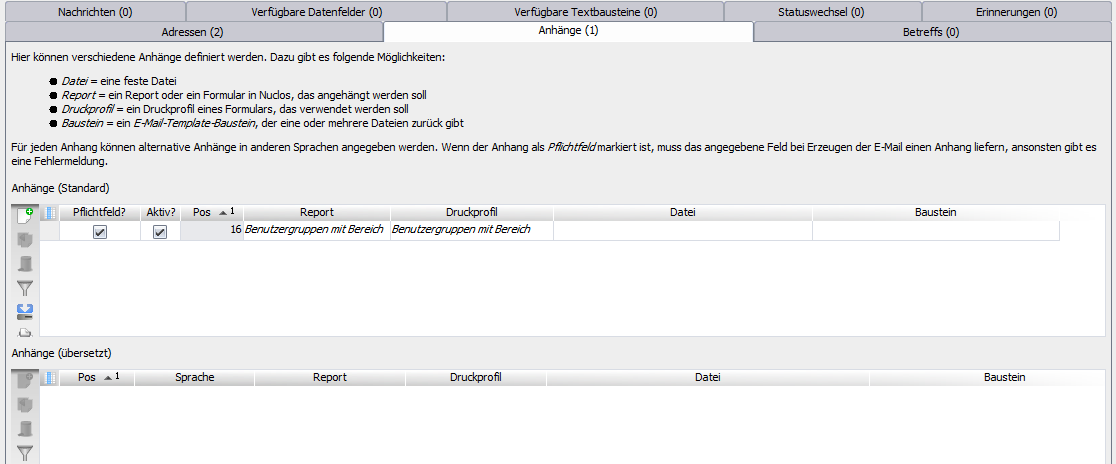
| Mark attachment as mandatory field | Email attachments can now, in the subform Attachments of the layout E-Mail-Template be marked as mandatory (Mandatory field?). If the calculation yields no attachment, an error message appears and the email is not sent.
|
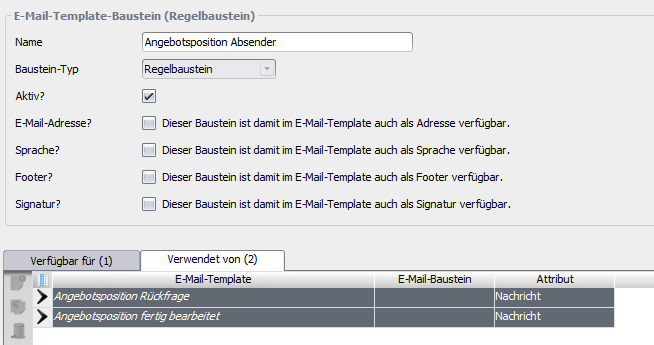
| Show use of building blocks | The use of individual blocks can now be shown in the layout E-Mail-Template-Bausteine (all instances) are displayed. From there you can jump directly to the respective usage.
|
Version 1.1.7
Description of the changes in version 1.1.7
| Topic | Description | ||||||||
|---|---|---|---|---|---|---|---|---|---|
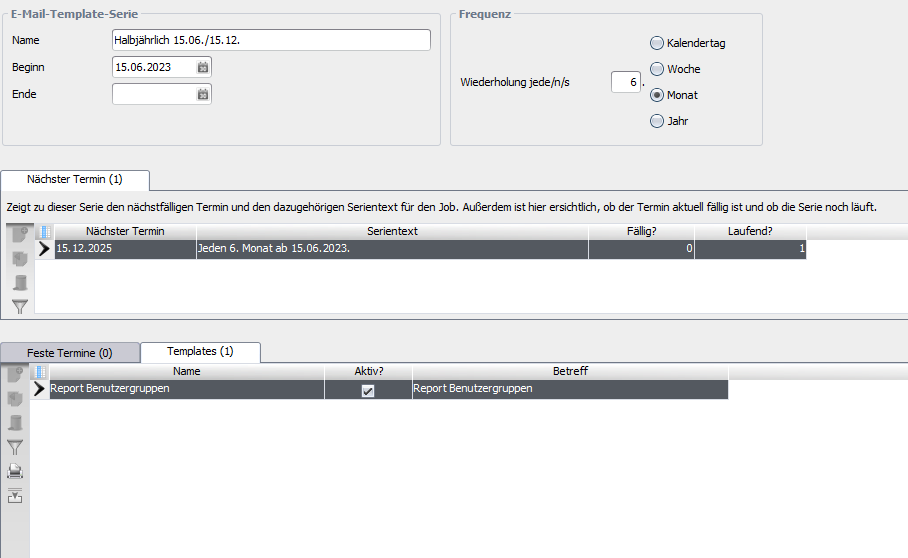
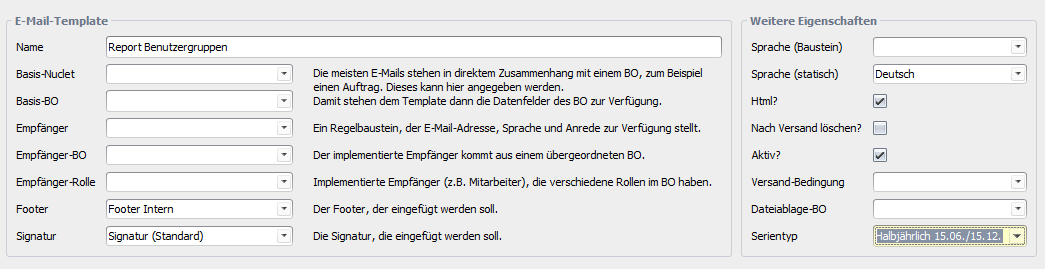
| recurring email series | The field Serientyp im Bereich Further properties im E-Mail-Template enables the configuration of recurring series by email, e.g. to send reports regularly. Series with different patterns (see screenshot) can be created and linked. The emails are sent via the job Versende Erinnerungen sent daily if the criteria apply. Series can only take effect from a date (Beginn) and optionally end on a certain date (Ende).
The new Nuclet parameter Base date for series can be changed if necessary to catch up on past series or to test the functionality: Format: "TT.MM.JJJJ" Current date with "."
| ||||||||
| Parameter for the current date | A new parameter with the following syntax makes it possible to perform calculations with the current date. Days, months or years can be added or subtracted. ...
<b>bis spätestens ##{(HEUTE|TODAY)([+-][0-9]{1,4})([TD]|M|[JY])}</b>
...
Examples:
| ||||||||
| Dispatch condition for subform Addresses | It is now also possible, in the subform Addresses dispatch conditions can be stored - they decide whether the respective address line is included in the email. |
Version 1.1.6
Description of the changes in version 1.1.6
| Topic | Description |
|---|---|
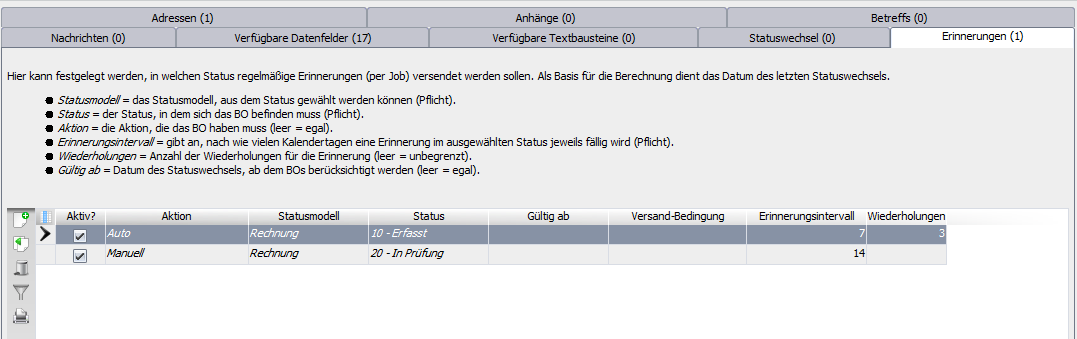
| recurring email reminders | The tab Erinnerungen im Reiter Configuration im E-Mail-Template enables the configuration of recurring reminders by email. A positive value for the reminder interval can be set for each status (Kalendertage) and optionally the positive number of repetitions (otherwise unlimited). The emails are sent via the job Versende Erinnerungen sent daily if the criteria apply. Reminders can only take effect from a date (Valid from) and, if needed, further via a Versandbedingung be restricted.
The reference date is always the day of the relevant state change. |
| Parameter in E-Mails | Parameters provided via rules if applicable ( ...
die o.g. Rechnung ist seit §§{INTDAYSPAST} Tagen im Status <i>20 - Prüfung</i>.
...
|
Version 1.1.5
Description of the changes in version 1.1.5
| Topic | Description |
|---|---|
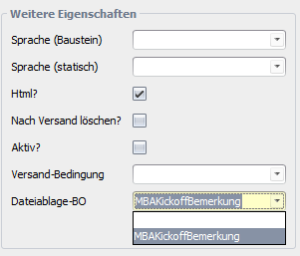
| Store emails as file | Under Dateiablage-BO im E-Mail-Template relevant subtables with a file attachment are now offered for selection.
If selected, the emails sent via this template are saved in the corresponding BO as an .eml file. |
Version 1.1.4
Description of the changes in version 1.1.4
| Topic | Description |
|---|---|
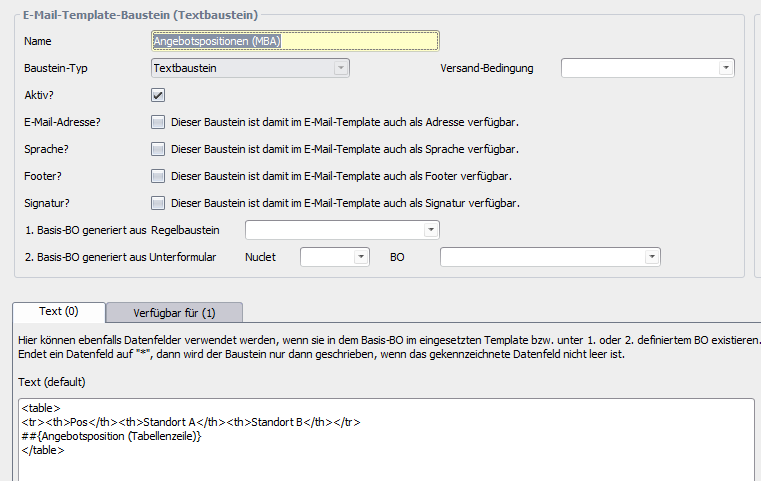
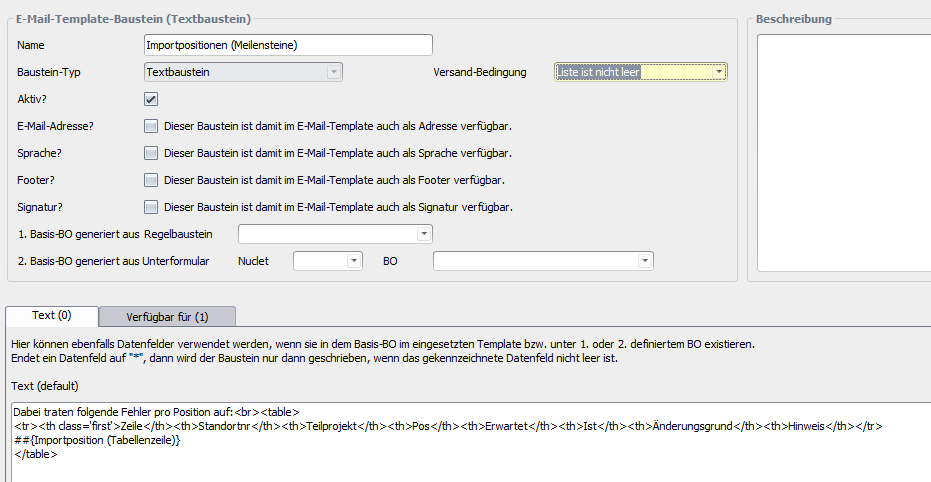
| Text blocks: subform data in general and via rule block | You can now either output all subform data in tabular form (base BO generated from subform) or additionally restrict this via a rule block (generated from rule block). 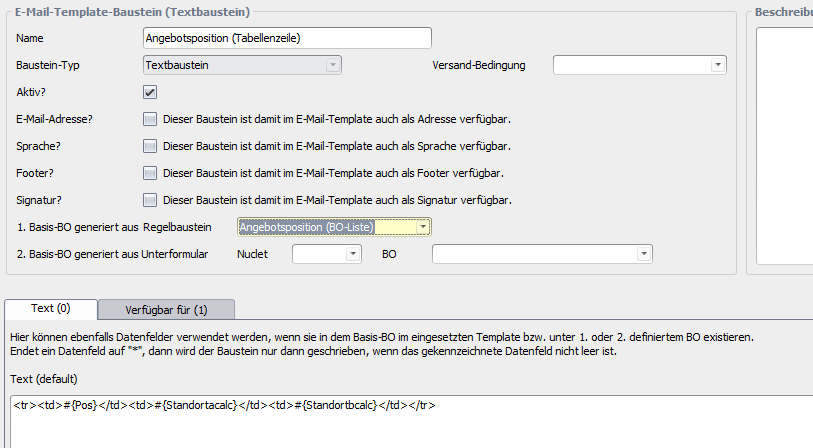 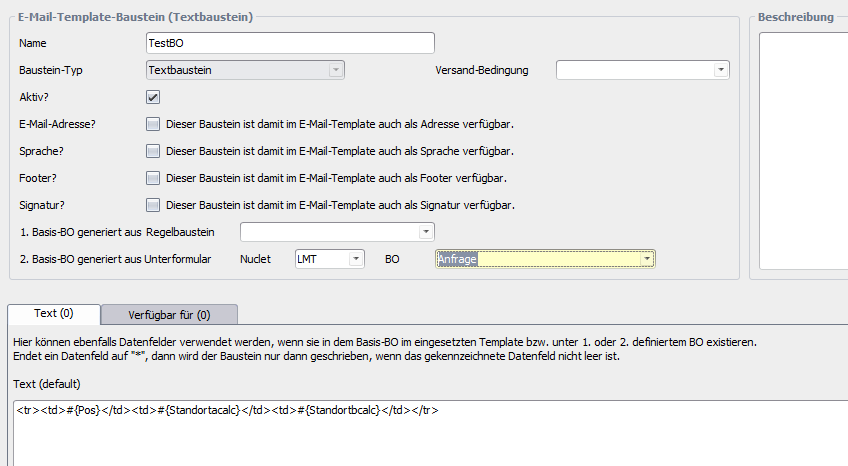 Such text blocks are output as a table via a further text block.
|
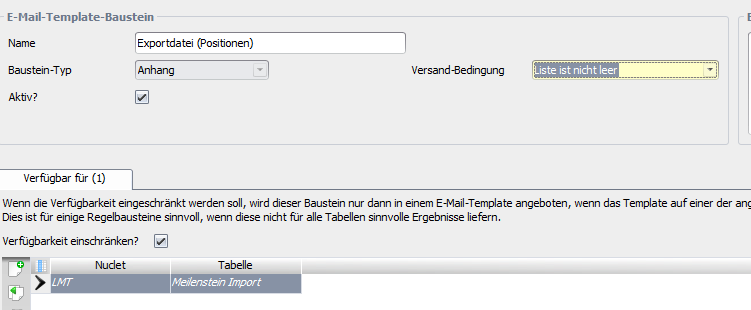
| Dispatch condition for text and attachment blocks | A dispatch condition can now be specified for text and attachment blocks.
|
Version 1.1.3
Description of version 1.1.3
| Topic | Description |
|---|---|
| E-Mail Template | The BO E-Mail-Template offers the option to create templates for emails, which can then be sent from within rules. This gives an administrator the option to design the emails sent by Nuclos themselves and to change them at short notice. The templates offer many options for this:
More complex email components, such as a table with all sales order items, must be supported by a rule. |
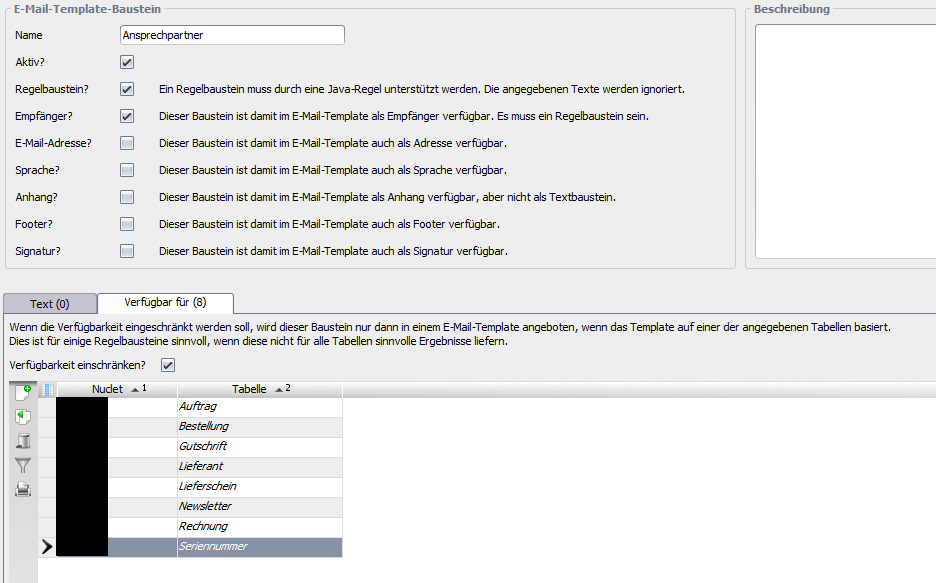
| Email block | Blocks can be defined that are then available in the email templates. Possible are Textbaustein
Rule block
Recipients
Attachment
Versandbedingung
For safety, blocks can be restricted to certain BOs, e.g. if the block Bearbeiter for the BOs Rechnung and Sales order exists but not for the BO Articles |
| E-Mail Sprache | Defines the available languages |
| Regelbausteine | To create an email from an email template, an instance of a class must be passed that implements the interface Regelbausteine is implemented. The Nuclet comes with an implementation that contains some examples. If you need your own rule blocks, you should create your own implementation in your Nuclet so that it is not overwritten when the email Nuclet is updated. In the method EMailUtils.getRegelBausteine() then simply create this implementation. |
Configuration of email templates from version 1.1.3
| E-mail template section | ||
|---|---|---|
| Name | Pflicht | Unique name of the template |
| Base Nuclet | optional | The Nuclet from which the base BO should come |
| Base BO | optional | The BO to which the email refers (e.g. Sales order) |
| Recipients | optional | A rule block that is marked as Recipients and for which the method getRecipient() returns a result with email address, salutation and, if applicable, language in the rule block implementation |
| Recipient BO | optional | If the recipient is, for example, generally implemented as a rule block for the BO Employees has been implemented can simply be Employees be specified |
| Recipient role | optional | If the Employees occurs in various roles in the base BO, this can be specified here, e.g. Contacts or Kundenberater |
| Footer | optional | Ein als Footer marked text block |
| Signatur | optional | Ein als Signatur marked text block |
| Further properties section | ||
| Language (block) | optional | The language in which the email should be sent, defined by a block marked as Sprache marked text block |
| Sprache (statisch) | optional | The language in which the email should be sent, specified directly |
| Html? | optional | Email is sent in HTML format (recommended) |
| Delete after sending? | optional | Sensitive emails (e.g. with password links or similar) can be deleted automatically from the email log after sending |
| Active? | optional | Activates or deactivates the sending of the emails |
| Versandbedingung | optional | Here a rule block can be selected that is a dispatch condition deciding whether the email should be sent |
| Template test section | ||
| ID of the base BO | optional | If a base BO is specified, an intid can be entered here for which the preview is created and the test email is sent |
| Sprache | optional | Here the language of the preview and the test email can be forced |
| Recipient of the test email | optional | If no recipient is specified, the email is sent to the Email redirection to address stored in the Nuclet parameter. |
| Create preview | Creates a preview in the tab Vorschau | |
| Sends test email | For the final test, a test email can thus be sent | |
| Configuration tab | ||
| Subject + message | optional | Here subject and message can be defined. The following can be used
Alternative texts in other languages can be specified for subject and message (see tab Subjects (translated) and Messages (translated)) |
| Addresses tab | optional | Wenn ein Recipients is specified, the email is sent to the email address determined there. Additionally or alternatively, further addresses can be added from
|
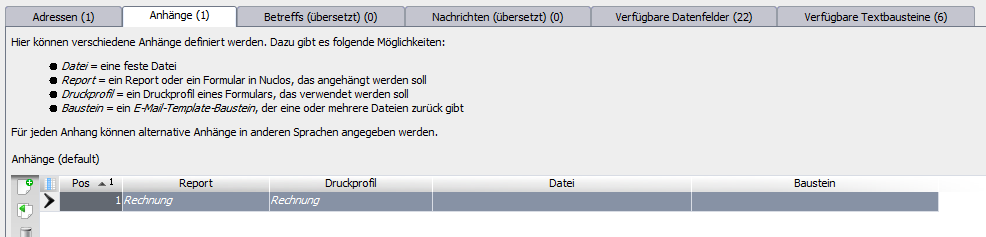
| Attachments tab | optional | Here attachments for the email can be defined, e.g.
Alternative attachments in other languages can be defined for each attachment |
| State change tab | optional | Here you can configure at which state change the email should be sent. However, a corresponding rule must be assigned for every possible state change of the affected state model. Helpful for this rule is then the method EMailUtils.sendAllAcceptedEMails(StateChangeContext context, RegelBausteine regelBausteine) |
| Weitere | ||
| Description tab | optional | Further information for the template can be stored here |
| E-mails tab | Shows the emails that have already been generated from this template | |
Use of email templates from version 1.1.3
| Initialisierung | |||||||||||||||
|---|---|---|---|---|---|---|---|---|---|---|---|---|---|---|---|
After the Nuclet import, the job Initialisiere Nuclet Emailversand must be run once. | Among other things, the job creates some standard email blocks so that you can build a template right away. | ||||||||||||||
| E-Mail-Template | |||||||||||||||
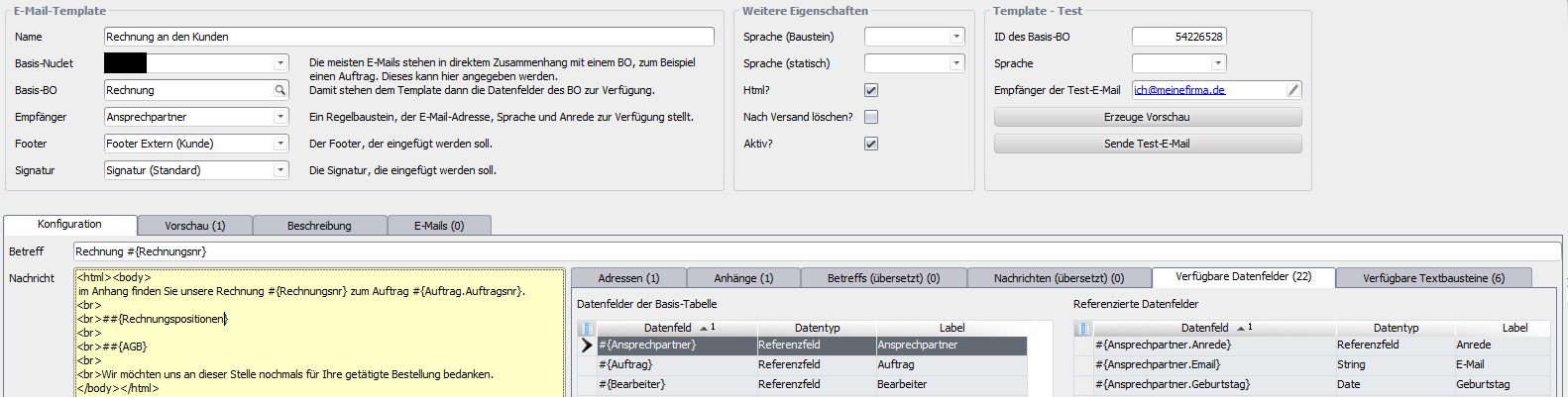
| An email template for an invoice could look like this, for example |
| ||||||||||||||
| Invoice form as attachment |
| ||||||||||||||
| Rule block for a recipient |
| ||||||||||||||
| The Regelbausteine interface | |||||||||||||||
| |||||||||||||||
| Example (text) | |||||||||||||||
public String getValue(final String name, final Modifiable<Long> bo, EMailTemplateSprache language, TemplateParameters parameters, RuleContext context) throws BusinessException { throw new BusinessException("Unknown name for a rule block: \"" + name + "\""); | |||||||||||||||
| Example (recipient) | |||||||||||||||
@Override if (ANSPRECHPARTNER.equals(name)) { throw new BusinessException("Unknown name for a recipient: \"" + name + "\""); | |||||||||||||||
| Example (use in rules) | |||||||||||||||
| Simplest case | EMailTemplate template = EMailUtils.getEMailTemplate(Konstanten.EMailTemplate.RECHNUNG); | ||||||||||||||
| Creation of templates (class EMailTemplateKonfiguration) | |||||||||||||||
The class EMailTemplateKonfiguration provides data structures and methods to create languages, blocks and templates via rules. This can be particularly helpful during Nuclet development, to recreate such objects on other instances. | |||||||||||||||
| Available data structures |
| ||||||||||||||
| Available methods for creation |
| ||||||||||||||
| Example (block configuration) | public static final EMailTemplateKonfiguration.Baustein FOOTER_INTERN = new EMailTemplateKonfiguration.Baustein() {{ | ||||||||||||||
| Example (template configuration) | public static final EMailTemplateKonfiguration.Template TEMPLATE_PROJEKT = new EMailTemplateKonfiguration.Template() {{ | ||||||||||||||
| Creation example | EMailTemplateKonfiguration.createBaustein(FOOTER_INTERN, jobContext); | ||||||||||||||
Description of version 1.1.2
| Topic | Description |
|---|---|
| E-Mail Umleitung | For test operation, email redirection can be activated. All outgoing emails are then redirected to a defined address. The email additionally states to whom it would actually have gone. |
| E-Mail Protokoll | All emails to be sent and all sent emails are stored in the email log (under System) . Saving of the sent emails can be switched off in the Nuclet parameters. |
| E-Mail Queue | There are two different options for sending emails: Send immediately The email is sent immediately. If sending is triggered by a user (e.g. by a state change that triggers an email dispatch), they must wait until this process is complete before they can continue working. If an error occurs during email dispatch, the entire action (e.g. state change) of the user is undone. Dispatch via email queue The email is first stored in the email log as an unsent email and only sent by a regularly running job (Administration > Job control > Send emails). This must of course be activated. This means the user is not held up unnecessarily long during their work, and a faulty email dispatch does not lead to the cancellation of their action. |
| E-Mail Empfang | The job EMailEmpfang creates an entry in the email log with the flags for new emails on the server specified in the IMAP system parameters Versendet = false, Empfangen = true, Verarbeitet = false. |
| Use in rules | Die Klasse EmailVersand stellt zwei Methoden bereit |
Use in rule programming of version 1.1.2
| Klasse EMailVersand | |
|---|---|
static void sendMail(EMailContext context) | Sends the email defined in the context |
static void sendMailNow(EMailContext context) | Sends the email defined in the context immediately, regardless of the settings in the Nuclet parameters |
| Klasse EMailContext | |
void addRecipient(String address, int type) | Adds a recipient (type = To, CC or BCC) |
void addRecipient(String address) | Adds a recipient (To) |
void addRecipients(List<String> lRecipients, int type) | Adds a list of recipients (type = To, CC or BCC) |
void addRecipients(List<String> lRecipients) | Adds a list of recipients (To) |
void addAttachment(NuclosFile file) | Adds an attachment |
void addAttachments(List<NuclosFile> lAttachments) | Adds a list of attachments |
void setReplyTo(String replyTo) | Defines (reply address differing from the sender) |
void setMessage(String message) | Defines the email message |
void setSubject(String subject) | Defines the email subject |
void setReference(String reference) | Defines a reference. This can be, for example, a sales order number. The reference has no influence on the email, but helps to find emails in the log that belong to a certain sales order. |
void resetAttachments() | Clears the list of attachments |
void resetRecipients() | Clears the list of recipients |
| Example (email sending) | |
EMailContext context = new EMailContext(); | |
| Example (email reception) | |
Query<EMailProtokoll> query = QueryProvider.create(EMailProtokoll.class); |
Integration
The integration after a successful Nuclet import (see Nuclet import) is to be carried out as follows.
| Step | Description | Screenshot | ||||||||||||||||||||
|---|---|---|---|---|---|---|---|---|---|---|---|---|---|---|---|---|---|---|---|---|---|---|
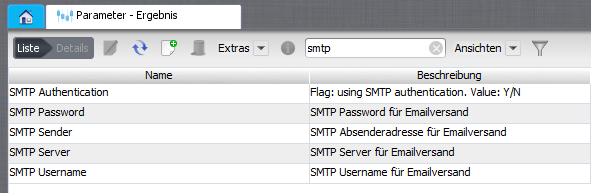
| 1 | Configure the Nuclos parameters for using the MailProvider in Nuclos (under Administration > Parameters):
See also Parameter für Mailversand. |
| ||||||||||||||||||||
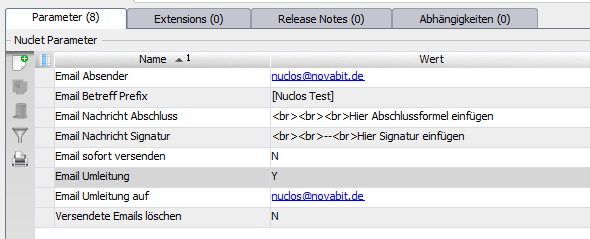
| 2 | Configure the Nuclet parameters of the Nuclets Emailversand (under Configuration > Nuclet Management)
|
|
Version 1.1.0
Integration / description of version 1.1.0
The integration after a successful Nuclet import (see Nuclet import) is to be carried out as follows.
| Step | Description |
|---|---|
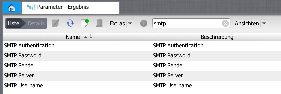
| 1 | Configure the SMTP system parameters required for using the MailProvider in Nuclos (at least SMTP Authentication, SMTP Username, SMTP Password, SMTP Server, SMTP Sender). See also Parameter für Mailversand.
|
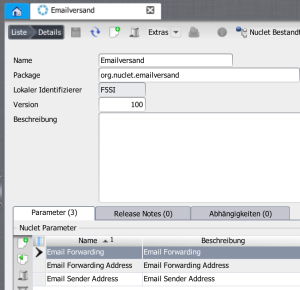
| 2 | Configure the From/ReplyTo address to be set by Nuclos in the Nuclet parameter "Email Sender Address". Furthermore, activate or deactivate the redirection as desired in the Nuclet parameters "Email Forwarding" ("Y" or "N") and "Email Forwarding Address". If the redirection is activated, all emails sent via this Nuclet are not sent to the actual recipient, but redirected to the address specified in "Email Forwarding Address". In this way, the implementation of automatically sent emails in your own Nuclet can be tested easily, or a test system can be configured easily so that it does not send any emails to your customers or suppliers.
|
| 3 | Adapt the signature to be used in the class EMailSignatur to your requirements. |
| 4 | Use the newly gained functionality by sending emails e.g. to your customers and suppliers. The following methods are available for this: EMailVersand.sendEmail(String sRecipient, String sSubject, String sMessage, NuclosFile attachment, String lang) EMailVersand.sendEmail(List<String> lRecipient, String sSubject, String sMessage, NuclosFile attachment, String lang) EMailVersand.sendEmail(List<String> lRecipient, List<String> lRecipientCC, List<String> lRecipientBCC, String sSubject, String sMessage, Emails sent via these methods are stored and archived under the menu item System | Email log. Remember to grant your users read permission for this menu item if necessary. Example: String sSubject = "Your invoice"; String sMessage = "Please find your invoice attached"; (new EMailVersand()).sendEmail(kunde.getEmailadresse(), sSubject, sMessage, pdfInvoice, "de"); |
Related pages
Überblick
Inhalte