
Language: Deutsch · English
 Reference fields and subforms
How to control reference fields, object generators and subforms in the Web Client via popup and layout parameters.
REFERENZ LOW-CODE / DEVELOPER UPDATED: JUL 2026 APPLIES TO NUCLOS 4.2026.X
On this page
Reference fields / object generators in popups
Opening reference-field entries or calling object generators in popups is configured in the layout editor via the advanced property popupparameter, e.g.:
left=100,top=100,width=600,height=400,status=yes,scrollbars=yes,resizable=yes
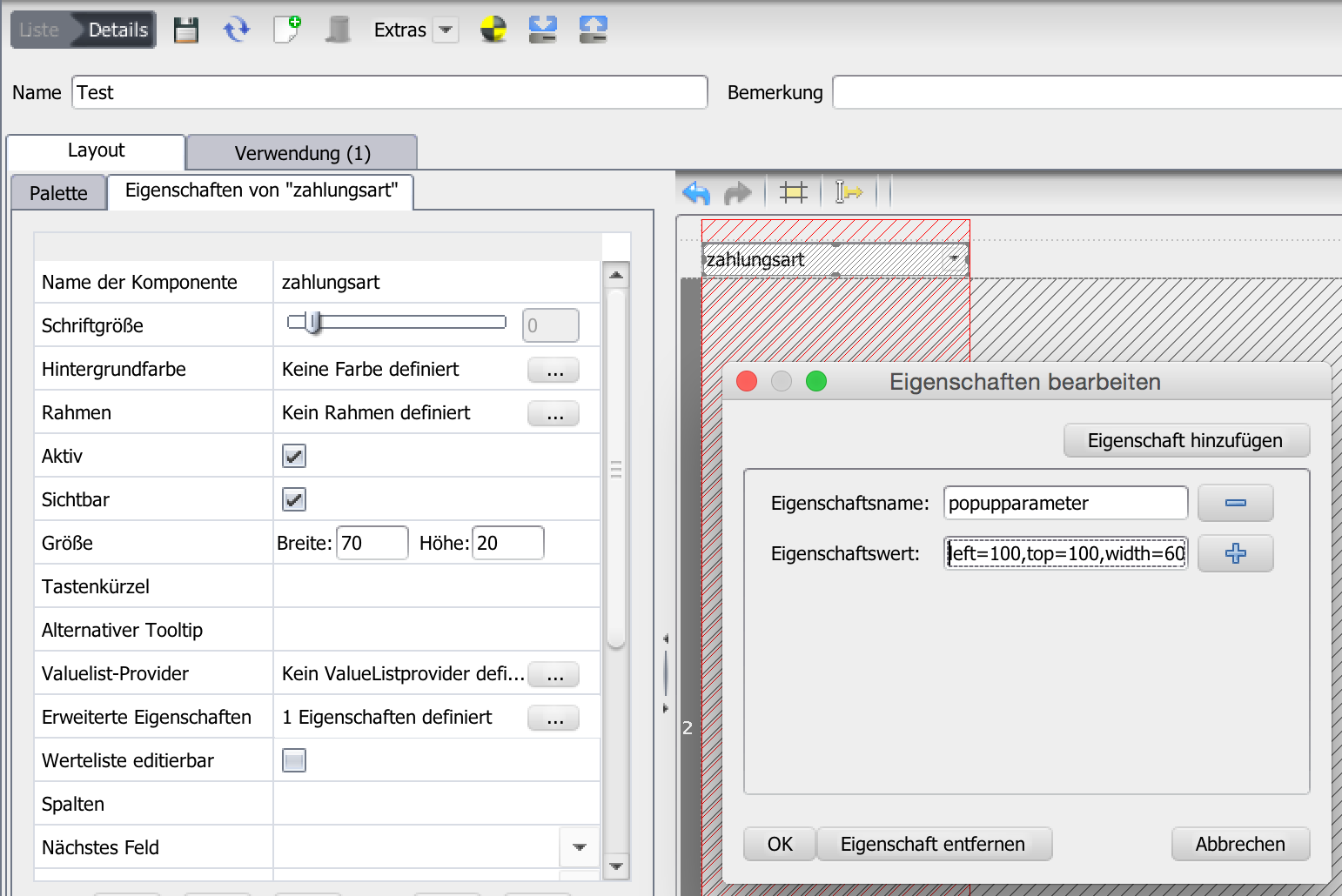
Reference-field popup in the Web Client.
The same applies to reference fields in subforms (advanced property of the column). To open as a tab instead of a window:
menubar=yes,toolbar=yes,location=yes,status=yes,scrollbars=yes
Subform records in popups
Via the record's L&F parameters (toolbar context menu: „Open subform records in popup“) using the same popup parameters.
Initial read-only view for subforms
For faster loading of complex layouts, subforms can start read-only (advanced property initialreadonly = true). A double-click or the pencil icon switches to the regular view.
More options
Further tuning: popupparameter = false opens references from subform lists inline; NO_CLOSE = yes in LoVs suppresses auto-close after a reference change.
Related pages
Überblick
Inhalte