
Language: Deutsch · English
 List views
Configure columns, save views and share them with user groups – shared across Web and Desktop client.
REFERENZ USER UPDATED: JUL 2026 APPLIES TO NUCLOS 4.2026.X
On this page
Shared source
From Nuclos 4.18 the Web and Desktop client share the same table settings – maintain views in either client and use them mutually.
List views apply to result lists and subforms. Show/hide columns, change sorting and widths. Configured views can be published to user groups.
Configure
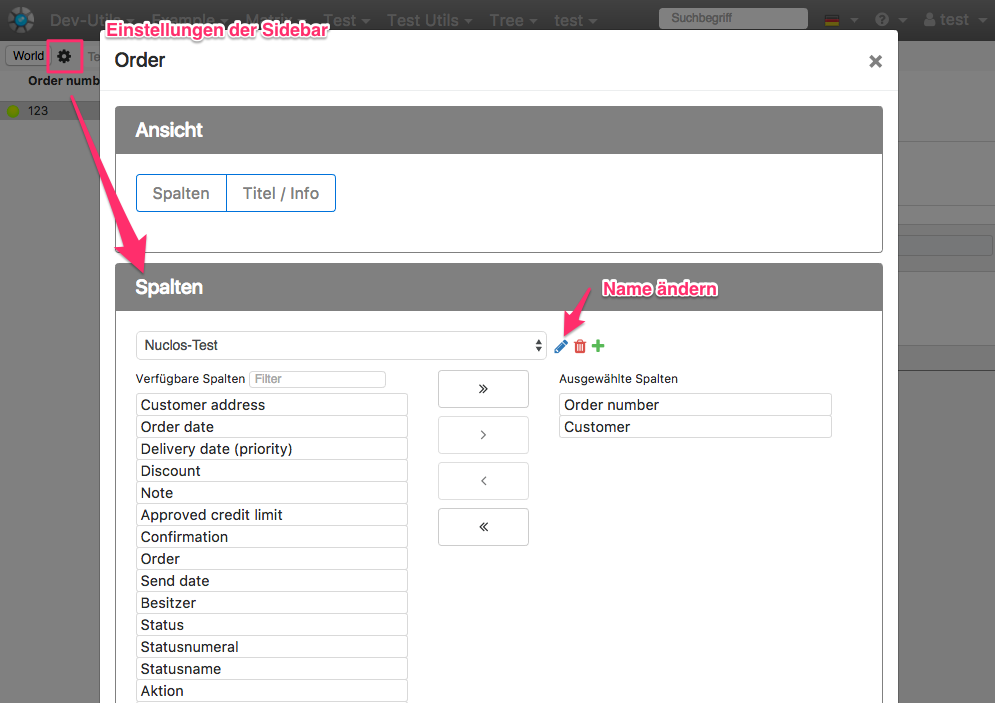
Column settings in the Web Client.
In the Web Client the gear sits in the toolbar; in the Rich Client with a vertical toolbar use a column header's context menu.
Share settings
Only via the Web Client (right Share settings): user menu → Manage settings. Select a view and assign it to a user group (share).
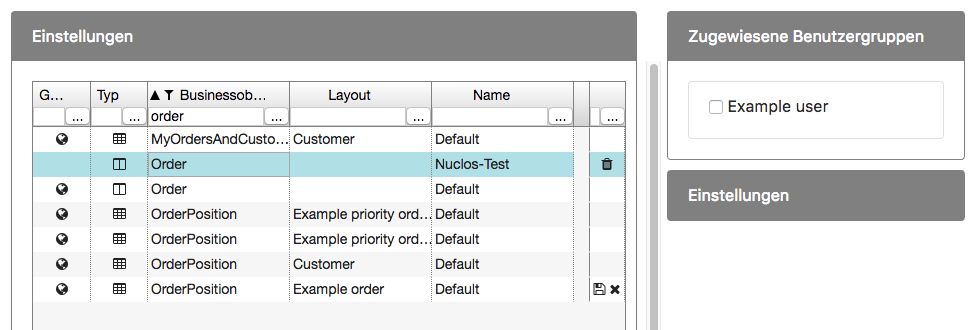
Manage settings.
Shared settings show a globe icon. After changes, share again and discard change are available (Desktop client: „reset current list view to template“).
Nuclet assignment & layout restriction
When sharing, a setting can be assigned to the business object's Nuclet. Subform settings are bound to the layout by default; remove layout restriction makes them apply across layouts.
Permission
Right
The right Adjust table settings is required to persist views. Without it, sorting/widths are temporary only.
Additional setting
| Key | Description |
|---|---|
sideviewMenuWidth | width of the result-list sidebar (Web Client only): -1 = collapsed, 1 = full window, otherwise width in px |
Related pages
Überblick
Inhalte