
Language: Deutsch · English
 Colored rows
Color list rows based on data – across clients via the NuclosRowColor attribute.
HOW-TO LOW-CODE / DEVELOPER UPDATED: JUL 2026 APPLIES TO NUCLOS 4.2026.X
On this page
To color rows in the list view, add an attribute NuclosRowColor to the BO (case-insensitive) and fill it with an HTML hex code (#RRGGBB) per record.
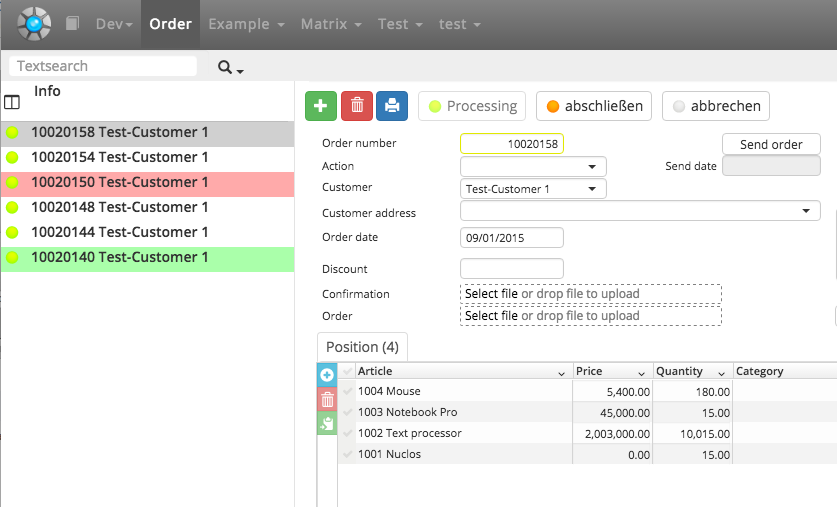
Colored rows in the list view.
Recommendation
Groovy rules for color logic no longer work in the Web Client. Implementation that works in both clients:
- Add attribute
NuclosRowColor(String). - Fill it as a calculated attribute via a DB function with the hex code (the logic belongs in the DB function, not in Groovy).
- For the Rich Client a Groovy rule that only forwards the DB value suffices:
return <NUCLET>.<BO>.NuclosRowColor;– the Web Client ignores it.
The Web Client does not show the attribute as a column but interprets it as the row color. Example DB function (MS SQL Server):
CREATE FUNCTION R0X7_CA_AP_ROWCOLOR(@id NUMERIC) RETURNS VARCHAR(255) AS
BEGIN
  DECLARE @val VARCHAR(255);
  DECLARE @free NUMERIC(9,2);
  DECLARE @used NUMERIC(9,2);
  select @free = min(bestand-reserviert) from R0X7_V_BESTANDSPLANUNG
    where intid_strauftragsposition = @id;
  select @used = dblmenge from R0X7_MESSEAUFTRAGSPOSITION where intid = @id;
  if (@free > (@used + 10)) select @val = '#01DF01';
  else if (@free > @used) select @val = '#F7FE2E';
  else select @val = '#FF0000';
  return @val;
END;
Related pages
Überblick
Inhalte