
Language: Deutsch · English
 Planning board
Graphical resource planning on a timeline – resource/booking BO, wizard, relative date expressions and Groovy formatting.
HOW-TO APPLICATION DEVELOPER STAND: JUL 2026 GILT FUER NUCLOS 4.2026.X
Auf dieser Seite
What is a planning board?
With planning boards (menu Configuration → Planning board) you configure graphical interfaces to plan arbitrary resources on a timeline – people, rooms, vehicles, machines, production lines and more.
Freely configurable
- display of resources, bookings and legend,
- time window and granularity (hours/days/weeks),
- highlighting of periods (weekends, holidays) and bookings (colours),
- context functions, milestones and GANTT view,
- permissions.
Use by end users
- drag & drop to move/extend and between resources,
- create/copy/delete bookings, edit via double-click,
- bulk editing, personal display, filtering.
Automation
With rules bookings can be generated automatically (e.g. production orders from customer orders) or checked and notified on create/change/move/delete.
Configuration (example: utilization plan)
1. Resource and booking BO
Create a resource BO (e.g. employee) and a booking BO with a reference to the resource plus date from/to (optionally time from/to).
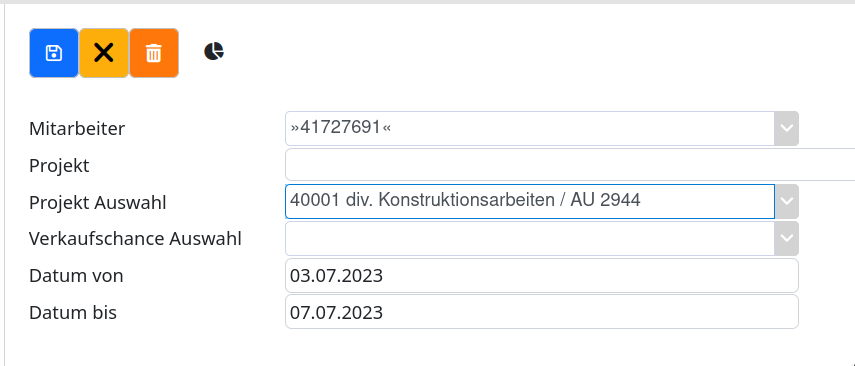
Booking BO for planning.
2. Wizard: name, label, BOs
The wizard guides you through internal name, label/menu path and selecting the resource BO (with sort field) and booking BO (with relationship).
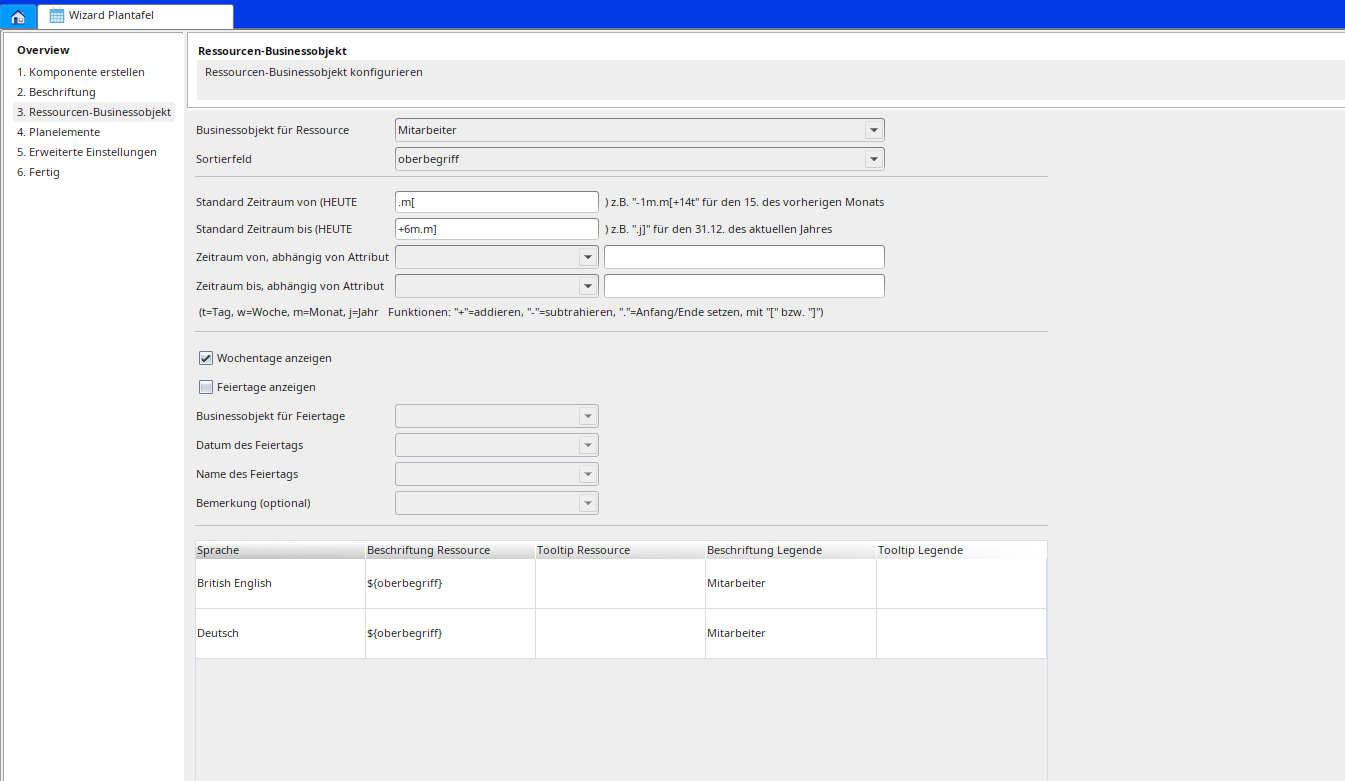
Resource/booking BO in the wizard.
Relative date expressions for the period
The default period is calculated relative to TODAY (evaluated left to right):
| Character | Meaning |
|---|---|
| + / - | add / subtract |
| . [ or . ] | jump to start [ or end ] |
| t / d | day |
| w | week |
| m | month |
| j / y | year |
| Period | From | To |
|---|---|---|
| current month | .m[ | .m] |
| current year | .j[ | .j] |
| until end of next month | .m[ | +1m.m] |
| until 15th of next month | .m[ | +1m.m[+14t |
In the table below you define the display and legend; field content via variables, e.g. resource ${strnachname} ${strvorname}, booking ${grundderbuchung}.
4. Plan elements & successor relations
Here you configure the displayed entries. Successor relations (e.g. critical path) are based on a BO with two reference fields to the booking BO and are drawn as a connection. Optional: staged view, milestones.
Script code (Groovy) for formatting
In the advanced settings two methods can be provided:
formatCell(clct, cell)– formats cells (resource/booking):cell.color,cell.text,cell.toolTip.formatBg(clct, interval, bg)– formats the background:bg.color(interval.start/interval.endare Date).
  def formatCell(clct, cell) {
    if (clct['meinFeld'] == 5) {
      cell.color = "#ff9999";
      cell.toolTip = "Text";
    }
  }
  def formatBg(clct, interval, bg) {
    if (interval.start <= new Date()) {
        bg.color = "#ffccff"
    }
  }


ODER
import java.text.SimpleDateFormat
def formatCell(clct, cell) {
Date currentDate = new Date();
def formatter = new SimpleDateFormat("dd/MM/yyyy");
String formatedDate = formatter.format(currentDate);
  if (clct['halbertag'] == true) {
    cell.color = "#ee8625";
    cell.text = clct['intmitarbeiter']+" ("+clct['von'] +" halber Tag "+clct['uhrzeit']+")";
  }else{
       cell.color = "#398db7";
       cell.text = clct['intmitarbeiter'] +" ("+formatedDate+" - "+clct['bis']+")";
  }
}
Notes
Attributes are accessed via clct['field'], colours as Color or hex string "#rrggbb". The methods must be entered manually in the settings under rule for formatting resource/booking (no dropdown). Missing properties only surface at runtime.
Related pages
Überblick
Inhalte