Nuclos view with documents: proxy BO, data/documents, t_ud_documentfile, getByElternObjekt, getById, FileProvider, DatasourceProvider. |
Language: Deutsch · English
Show documents from the file system in a view – via proxy BO, data source and server-side rule.
Auf dieser Seite |
A virtual or generic business object is not enough for a view that shows documents: the files are not in the database but in the server directory [nuclos-home]/data/documents. The database only holds name and ID.
Therefore we use a proxy BO. This builds the view via Java code so we can load the documents from the file system.
Proxy BOs can only be attached as a subform to a parent object. To make it standalone, you need a write proxy BO. |
Use the BO wizard to create a proxy BO with at least one field for the document attachment and a reference to the parent object. An interface is generated automatically, which we implement later.

Proxy BO in the wizard.
Create a data source that provides these fields and can be restricted to the parent object via a parameter:
elternid – reference to the parent objectdokumentid – document ID (table t_ud_documentfile)dokumentname – document name (table t_ud_documentfile)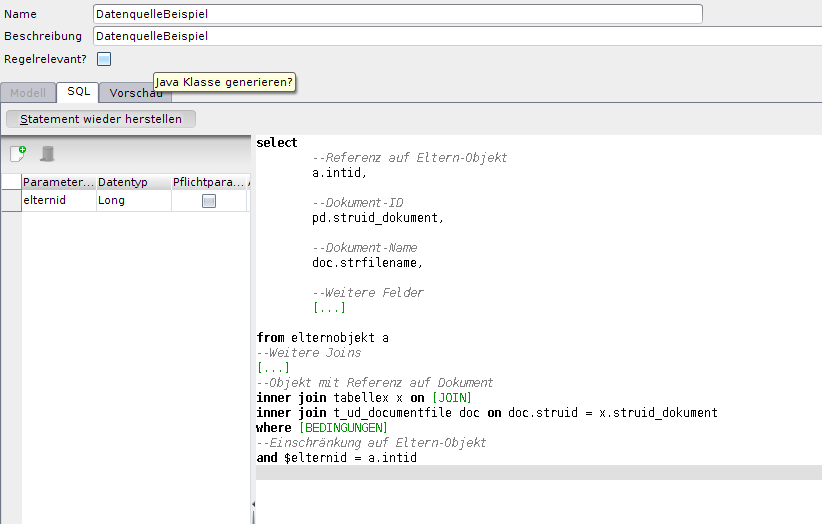
Data source of the view.
Create a rule via Rule sets → server-side rules (ideally named after the interface). For the standard case getByElternObjekt(Long) is enough – it is called when the proxy BO is shown via the parent object's layout. All other methods may return null.
If the document is to be downloaded directly from the proxy BO, you must also implement |
package org.nuclet.[nuclet];

import java.io.File;
import java.io.FileFilter;
import java.lang.reflect.InvocationTargetException;
import java.lang.reflect.Method;
import java.nio.file.Path;
import java.util.ArrayList;
import java.util.HashMap;
import java.util.List;
import java.util.Map;

import org.apache.commons.io.filefilter.WildcardFileFilter;
import org.nuclos.api.common.NuclosFile;
import org.nuclos.api.exception.BusinessException;
import org.nuclos.api.provider.DatasourceProvider;
import org.nuclos.api.provider.FileProvider;


public class BeispielObjektProxyImpl implements org.nuclet.[nuclet].BeispielObjektProxy{
	/*
	 * Getter-Methode für das Eltern-Objekt.
	 * Wir nutzen den Parameter, um das Ergebnis der Datenquelle einzuschränken.
	 * Es muss immer ein neues Proxy-Objekt erstellt werden, welches mit den Daten
	 * aus der Datenquelle gefüttert wird.
	 * Alternativ können die Daten auch von einer anderen Stelle kommen (Remote-Verbindung, QueryProvider etc.).
	 * Für den Dokumentenanhang holen wir uns mit Hilfe von dokumentid und dokumentname
	 * über die Methode getDocument() die Datei aus dem Installationsverzeichnis.
	 * @param pAngebotId = Id des Eltern-Objekts.
	 * @return Alle Zeilen des Proxy-BOs, die im Eltern-Objekt angezeigt werden sollen.
	 */
	@Override
	public List<BeispielObjekt> getByElternObjekt(java.lang.Long pElternobjektId) {
		List<BeispielObjekt> result = new ArrayList<>();
		/*
		 * Setze das Verzeichnis, in dem die Datei zu finden ist.
		 */
	    File dir = new File(getHomeDir() + "/data/documents/");
	    try{
	    	/*
	    	 * Setze die Parameter für die Datenquelle und führe sie aus.
	    	 */
			Map<String, Object> params = new HashMap<>();
			params.put("elternid", pElternobjektId);
			for (Object[] row :  DatasourceProvider.run(BeispielDatenquelleDS.class, params).getRows()){
				/*
				 * Erstelle neues Proxy-BO und füttere es mit Daten.
				 */
				BeispielObjekt b = new BeispielObjekt();
				Long elternid = (Long) row[x];
				b.setElternId(elternid);
				String dokumentid = (String) row[y];
				String dokumentname = (String) row[z];
				b.setDokument(getDocument(dokumentid, dokumentname,  dir));
				/*
				 * Setze weitere Felder
				 */
				b.set...(..);

				result.add(b);
			}
	    } catch (BusinessException e) {
	        e.printStackTrace();
	    }
		return result;
	}

	/*
	 * Ermittelt das Nuclos-Installationsverzeichnis.
	 */
    private String getHomeDir() {
        String home = "";
        try {
	        Class<?> clz = Class.forName("org.nuclos.server.common.NuclosSystemParameters");
	        Method getNuclosHome = clz.getMethod("getNuclosHome");
			home = ((Path) getNuclosHome.invoke(null)).toString();
		} catch (IllegalAccessException | IllegalArgumentException
				| InvocationTargetException | ClassNotFoundException | NoSuchMethodException | SecurityException e) {
			e.printStackTrace();
		}
        return home;
    }

    /*
     * Suche das Dokument im gegebenen Verzeichnis, packe es in eine NuclosFile und gib
     * dieser den gegeben Namen (andernfalls würden die Dokumente in der View unter ihrer
     * ID angezeigt werden).
     * @param documentId = ID des Dokuments.
     * @param anzeigename = Gewünschter Anzeigename des Dokuments.
     * @param dir = Verzeichnis, in dem das Dokument gesucht wird.
     * @return Eine NuclosFile oder null, wenn kein passendes Dokument gefunden wurde.
     */
	private NuclosFile getDocument(String documentId, String anzeigename, File dir) throws BusinessException {
		FileFilter fileFilter = new WildcardFileFilter(documentId + ".*");
		File[] files = dir.listFiles(fileFilter);
		if (files.length == 1) {
			NuclosFile file = FileProvider.newFile(files[0]);
			file.setName(anzeigename);
			return file;
		}
		return null;
	}

	/*
	 * Alle anderen Methoden müssen nicht weiter implementiert werden.
	 */

	@Override
	public void setUser(org.nuclos.api.User user) {
	}
	@Override
	public List<BeispielObjekt> getAll() {
		return null;
	}
	@Override
	public List<java.lang.Long> getAllIds() {
		return null;
	}
	@Override
	public BeispielObjekt getById(java.lang.Long id) {
		return null;
	}
	@Override
	public List<BeispielObjekt> getByDokument(org.nuclos.api.UID pNuclosdocumentfileId) {
		return null;
	}
	@Override
	public void insert(BeispielObjekt pWeitereDokumente) throws org.nuclos.api.exception.BusinessException {
	}
	@Override
	public void update(BeispielObjekt pWeitereDokumente) throws org.nuclos.api.exception.BusinessException {
	}
	@Override
	public void delete(java.lang.Long id) throws org.nuclos.api.exception.BusinessException {
	}
	@Override
	public void commit() {
	}
	@Override
	public void rollback() {
	}
} |
Finally, add the proxy BO to the parent object's layout like a normal subform.