FTP Nuclet – nuclet: ftp. |
Language: Deutsch · English
Data sheet and documentation entry point for the FTP Nuclet (file transfer via FTP integrated into Nuclos processes).
On this page |
This page was machine-translated from German as a first draft and is currently under review. The authoritative source remains the German original (see the language switch above). |
| Version | Date | Notes | Compatibility |
|---|---|---|---|
| 1.0.2 | 01.09.2019 | First published version | ab Nuclos 4.33.8 |
| 1.0.2 | 15.03.2021 | Added SFTP protocol | ab Nuclos 4.44.2 |
The "FTP" Nuclet supports FTP upload to an FTP server as well as FTP download from an FTP server.
| Topic | Description |
|---|---|
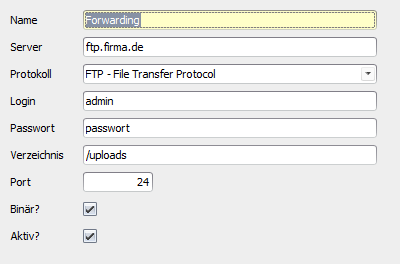
| FTP Server | Under System > FTP servers various FTP servers can be defined |
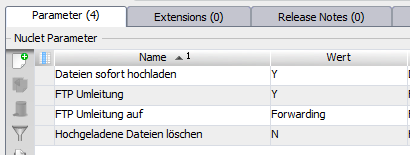
| FTP redirection | For test operation the redirection can be activated. All uploads are then redirected to a specified server. |
| FTP log | All files to be uploaded and all uploaded files are stored in the FTP upload log (under System). Storing the uploaded files can be switched off in the Nuclet parameters. |
| FTP Queue | There are two different options for FTP upload: Upload immediately The file is uploaded immediately. If the upload is triggered by a user (e.g. by a state change that triggers an upload), the user must wait until this operation is complete before they can continue working. If an error occurs during the upload, the entire action (e.g. state change) of the user is rolled back. Upload via queue The file to be uploaded is first stored in the FTP upload log as a not-yet-uploaded file and is only sent by a regularly running job (Administration > Job control > FTP upload). This must of course be activated. As a result, the user is not held up unnecessarily long during their work, and a faulty upload does not cause their action to be aborted. |
| Use in rules | The FTPUtils class provides several methods for this |
| Class FTPUtils | |
|---|---|
static boolean uploadFile(FTPContext context) | Uploads a file to an FTP server |
static boolean uploadFileNow(FTPContext context) | Uploads a file immediately to an FTP server, regardless of the settings in the Nuclet parameters |
static List<String> listFilesNow(FTPContext context, JobContext jobContext) | Returns a list of all files found |
static boolean downloadFileNow(FTPContext context) | Downloads a file immediately from the FTP server, regardless of the settings in the Nuclet parameters |
| Class FTPContext | |
void setServer(String name) | Defines the FTP server to be used |
void setServer(FTPServer server) | Defines the FTP server to be used |
void setFile(NuclosFile file) | Defines the upload file |
void setFile(File file) | Defines the upload file |
void setReference(String reference) | Defines a reference. This can be e.g. an order number. The reference has no influence on the upload or download, but helps to find files again in the log that belong to a particular order. |
void setDeleteAfterDownload(Boolean deleteAfterDownload) | The file is deleted on the FTP server after a successful download |
void setDownloadTarget(String downloadTarget) | Target file of the download (must not yet exist) |
void setDownloadSource(String downloadSource) | Source file of the download |
FTPServer getServer() | Returns the defined server |
NuclosFile getFile() | Returns the file to be uploaded |
String getDownloadSource() | Returns the path of the file to be downloaded |
String getReference() | Returns the defined reference (business note) |
boolean isDeleteAfterDownload() | Returns the setting for deleting the file on the server after the download |
| Example (upload) | |
FTPContext context = new FTPContext(); | |
| Example (download) | |
FTPContext ftpContext = new FTPContext(); |
The integration after a successful Nuclet import (see Nuclet Import) is to be carried out as follows.
| Step | Description | Screenshot | ||||||||||||||||||||
|---|---|---|---|---|---|---|---|---|---|---|---|---|---|---|---|---|---|---|---|---|---|---|
| 1 | Configure the Nuclet parameters of the FTP Nuclet (under Configuration > Nuclet Management)
|
| ||||||||||||||||||||
| 2 | Run the job once Initialisiere Nuclet FTP (under Administration > Job control) | |||||||||||||||||||||
| 3 | Configure your FTP servers
|
|