Nuclos subreports: JasperReport parameter, REPORT_DATA_SOURCE, JRNuclosDataSource, detail band, Run to Bottom, nuclos-reportapi.jar. |
Language: Deutsch · English
Display dependent records in a report – upload subreports, embed them via a parameter and feed them with data sources.
On this page |
A subreport displays dependent records (e.g. order positions of an order) inside a main report. As JasperReports does not embed subreports, they are stored separately from the main report.
In the subreports sub-form you upload the subreport file (*.jrxml or *.xml) and specify a parameter name. The subreport is passed to the main report via this name.
Subreport assignment with parameter name.
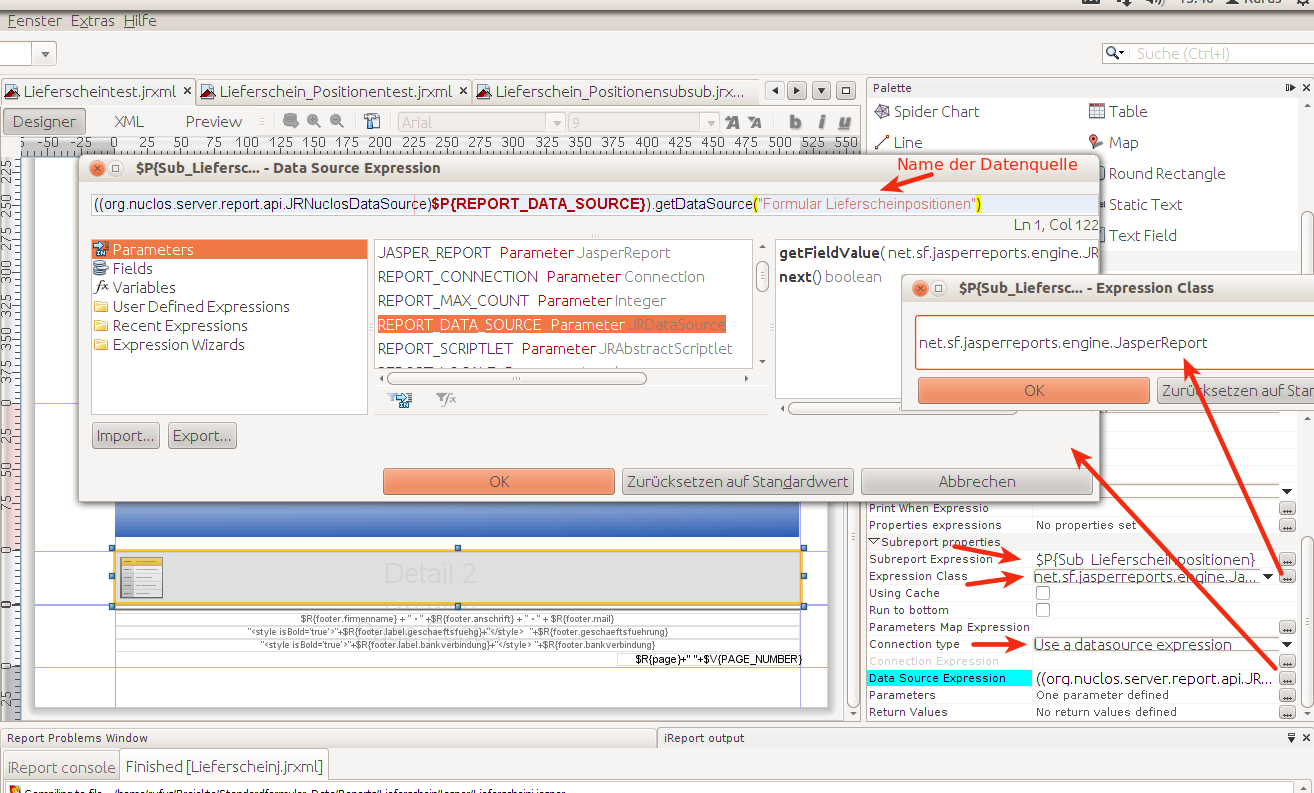
In the main report create a parameter with the name given above and type net.sf.jasperreports.engine.JasperReport. In the subreport properties set:
| Property | Value |
|---|---|
| Subreport Expression | $P{<parametername>} (e.g. $P{SUBREPORT_A}) |
| Expression Class | net.sf.jasperreports.engine.JasperReport |
| Connection type | Use a datasource expression |
| Data Source Expression | see code example below |
Add a parameter REPORT_DATA_SOURCE to the subreport properties with the following expression:
((org.nuclos.server.report.api.JRNuclosDataSource)$P{REPORT_DATA_SOURCE}).getDataSource("<Name der Datenquelle in Nuclos>") |
The subreport must be placed in the detail band of the parent report so that connection and context information is passed. Defined data-source parameters (e.g. intid) are filled automatically per main record from its fields.
For test compilation in Jaspersoft Studio, add |
If a whole form is used as a subreport: (1) maximise the executing band to page size, (2) set the subreport property Run to Bottom. Especially important with the last page footer.
Expansion behaviour: if a subreport is used in the title, page/column header or group header/footer, the property position type = float must be set. |
For building a sub-sub-report see Subreport within a subreport.