
Language: Deutsch · English
 Print a form
Print forms from the detail view – including the advanced print dialog and print service.
HOW-TO USER UPDATED: JUL 2026 APPLIES TO NUCLOS 4.2026.X
On this page
Forms are created from the detail form via the Print button. Depending on configuration the file is saved or shown directly.
Advanced print dialog
Version
Available from Nuclos 4.5.
Adjustable parameters: number of copies, duplex, paper tray, print service (server printer). Print profiles are grouped by form; a „+“ marks groups from several forms.
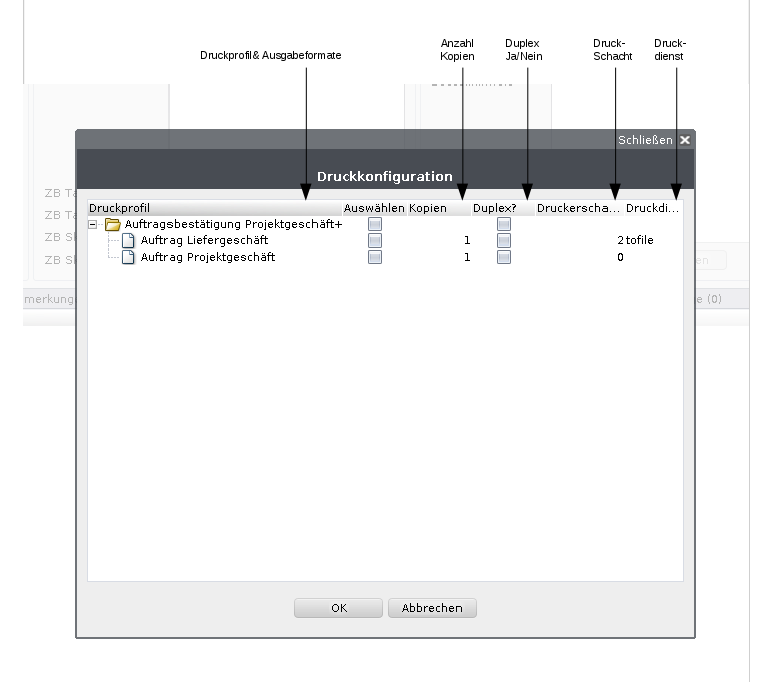
Advanced print dialog.
On confirmation, all selected output formats go to the Nuclos print spooling, which distributes jobs per user to the print services.
Print preview & mandatory print
The preview opens by double-clicking a print profile. Output formats defined as mandatory are pre-selected and cannot be deselected.
Related pages
Überblick
Inhalte