
Language: Deutsch · English
 Jasper extensions in Nuclos
Register fonts, scriptlets and barcode/QR libraries as server-side extensions in the Jasper classpath.
HOW-TO APPLICATION DEVELOPER UPDATED: JUL 2026 APPLIES TO NUCLOS 4.2026.X
On this page
What are Jasper extensions?
Whenever you add an extension to your Jasper report – e.g. a font package, a scriptlet library, a barcode generator or ZXing for QR codes – you must also register this server-side extension in Nuclos so the report can run.
1. Install the extension
Option A – via a nuclet: Configuration → Nuclets, select the nuclet, add the JAR in the Extensions tab and tick Server Extension?.
Option B – in the server directory: create a folder extensions/server in the Nuclos instance directory, place the JARs there and additionally under webapp/WEB-INF/lib in Tomcat.
2. Register the extension in the classpath
For the JasperReports component to use the extension, register it via the parameter under Administration → Parameters:
- Parameter name:
nuclos.jasper.reports.compile.classpath.jars.byclasses - Description: free text.
- Value: one class incl. package path per extension, separated by a space or a new line.
Mandatory values
These two mandatory values must always be present, otherwise reporting will not work:net.sf.jasperreports.engine.JasperReport org.nuclos.server.report.api.JRNuclosDataSource
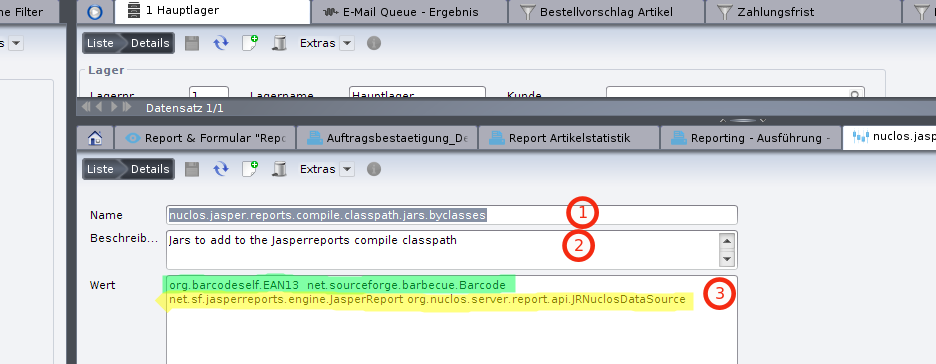
Classpath parameter in the administration.
Example value including ZXing (QR code):
net.sf.jasperreports.engine.JasperReport org.nuclos.server.report.api.JRNuclosDataSource com.google.zxing.BarcodeFormat com.google.zxing.WriterException com.google.zxing.client.j2se.MatrixToImageWriter com.google.zxing.common.BitMatrix com.google.zxing.qrcode.QRCodeWriter com.qrcodeself.QRCodeClass
Restart
After every change to the parameter a server restart is required.
Related pages
Überblick
Inhalte