
Language: Deutsch · English
 SSO configuration
Single sign-on via OAuth2/OIDC – callback URL, user mapping, sessions and two-factor authentication.
HOW-TO ADMINISTRATOR UPDATED: JUL 2026 APPLIES TO NUCLOS 4.2026.X
On this page
Menu Administration → SSO configuration. Nuclos supports single sign-on via OAuth2 and OpenID Connect (OIDC) using the authorization code grant.
Login from the client's perspective
Active services are offered as a login button when a client starts. The rich client uses the web client: the button opens the browser, guides through authentication and thereby also authorizes the rich client. The web client starts the process directly.
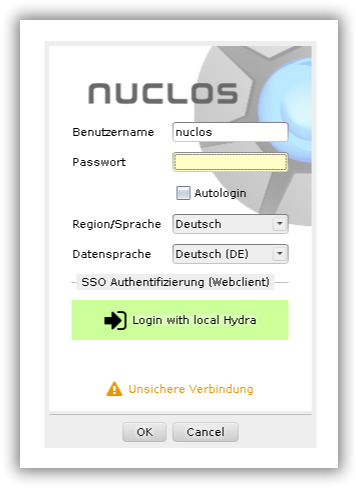
SSO login buttons at client start.
Configuration
The available SSO services are maintained in the Administration menu.
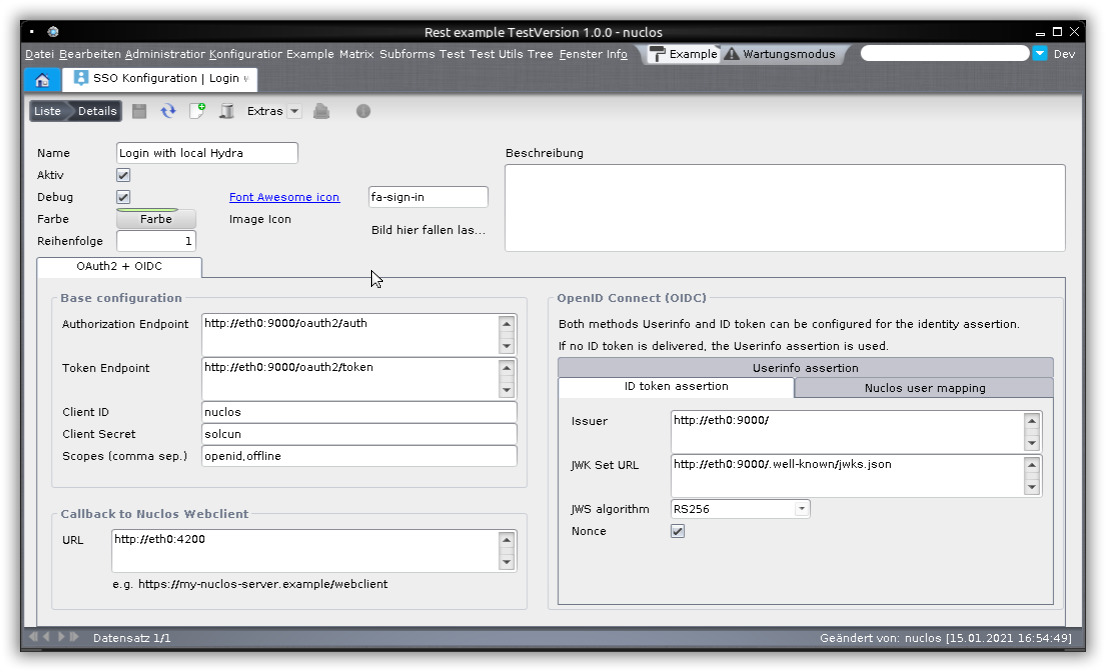
Configuring SSO services.
Callback URL to the web client
Always specify the root path of the web client at which a browser actually reaches it (consider load balancer/reverse proxy), e.g. https://my-nuclos-server.example/webclient.
OAuth2 settings
The required values are provided by your SSO provider. For testing, enable debug – log output goes to server.log.
OIDC: determining the user
User info comes either from an ID token (tab ID token assertion, preferred) or from the userinfo endpoint (tab Userinfo assertion). The ClaimsSet must yield the e-mail or user name of the Nuclos user; the matching attribute is configured under Nuclos user mapping (e-mail first, then user name).
E-mail prerequisite
For lookup via e-mail address the user must have allow login with e-mail address enabled.
Session, logout & cluster
- Refresh tokens are renewed regularly; without valid renewal the user is logged out (the rich client closes – so provide refresh tokens).
- The
JSESSIONIDremains decisive; this spares the OAuth2 service. - A Nuclos logout is (not yet) forwarded to the OAuth2 service and vice versa.
- In cluster operation sticky sessions are mandatory (SSO tokens reside only on the respective application server).
Two-factor authentication (2FA)
- Acr values (from 4.2022.36): enforces certain login methods via
acr_values(e.g. 2FA); the value is system-specific. - Auth level (from 4.2022.38, beta): numeric comparison value – only set with known compatibility.
Related pages
Überblick
Inhalte