Nuclos Jasper bands: title, page header, column header, group header, detail, summary, background, band height, page template. |
Language: Deutsch · English
Reference of JasperReports bands – title, header/footer, groups, detail and background including height rules.
On this page |
A report is defined via a page template split into horizontal sections – bands. Each band is printed a different number of times depending on its function (the page header per page, the detail band per record).
The sum of all band heights (except Background) must be ≤ page height minus top/bottom margin. The specified height is the minimum height – bands with text fields/subreports can stretch downwards. |
| Band | Purpose |
|---|---|
| Title | First visible band, created once; optionally on a separate page. |
| Page Header | Appears at the same position on every page. |
| Column Header | At the start of each detail column – typically column headings. |
| Group Header | Start of a group; can force a page/column break and be repeated. |
| Detail | Any number; repeated per record (unlimited total size). |
| Group Footer | Closes a group – e.g. subtotals, separator lines. |
| Column Footer | At the end of each column; not stretchable at runtime. |
| Page Footer | Page footer on every page with a header; not stretchable. |
| Last Page Footer | Different footer for the last page; ignored when height is 0. |
| Summary | Totals/averages at the end of the report (elsewhere „report footer“). |
| Background | Watermark/frame across the whole page; max. page height. |
Add further detail bands via Add Another Detail Band. The order can be changed in the XML view: the <band> elements sit between <detail>…</detail>.
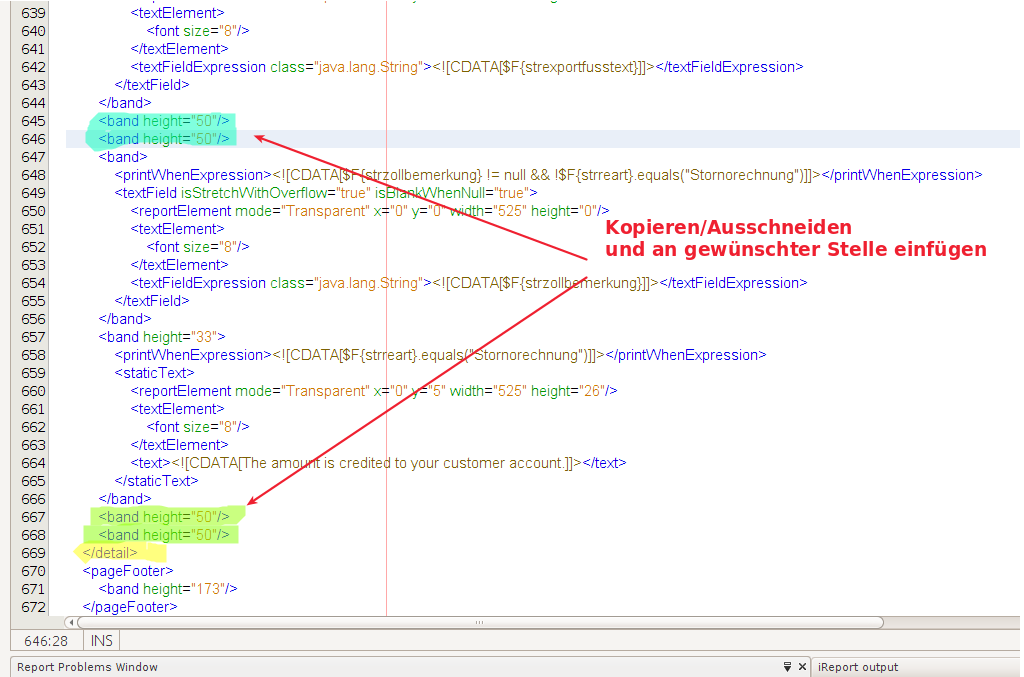
Detail bands in the XML view.