Nuclos SSO OAuth2 OIDC: authorization code, callback URL, ID token, userinfo, Nuclos user mapping, acr_values, 2FA, refresh token. |
Language: Deutsch · English
Single sign-on via OAuth2/OIDC – callback URL, user mapping, sessions and two-factor authentication.
On this page |
Menu Administration → SSO configuration. Nuclos supports single sign-on via OAuth2 and OpenID Connect (OIDC) using the authorization code grant.
Active services are offered as a login button when a client starts. The rich client uses the web client: the button opens the browser, guides through authentication and thereby also authorizes the rich client. The web client starts the process directly.
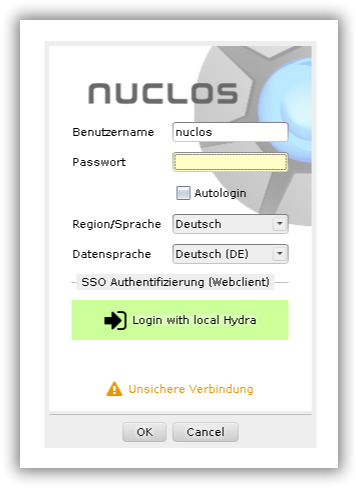
SSO login buttons at client start.
The available SSO services are maintained in the Administration menu.
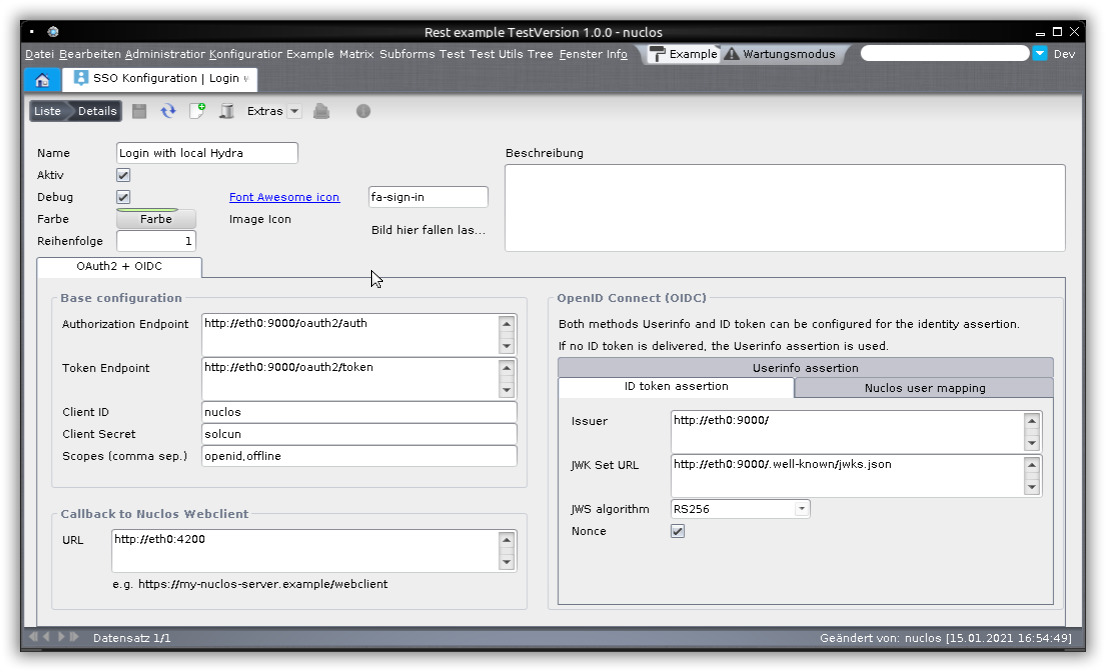
Configuring SSO services.
Always specify the root path of the web client at which a browser actually reaches it (consider load balancer/reverse proxy), e.g. https://my-nuclos-server.example/webclient.
The required values are provided by your SSO provider. For testing, enable debug – log output goes to server.log.
User info comes either from an ID token (tab ID token assertion, preferred) or from the userinfo endpoint (tab Userinfo assertion). The ClaimsSet must yield the e-mail or user name of the Nuclos user; the matching attribute is configured under Nuclos user mapping (e-mail first, then user name).
For lookup via e-mail address the user must have allow login with e-mail address enabled. |
JSESSIONID remains decisive; this spares the OAuth2 service.acr_values (e.g. 2FA); the value is system-specific.