Exchange Rates Nuclet – nuclet: ecb - exchange rates (not yet available). |
Language: Deutsch · English
Data sheet and documentation entry point for the Exchange Rates Nuclet (currency conversion and daily exchange-rate updates via the ECB interface).
On this page |
This page was machine-translated from German as a first draft and is currently under review. The authoritative source remains the German original (see the language switch above). |
Nuclet for currency conversions and exchange rate functionality
| Name: | Exchange Rates |
| Package: | org.nuclet.exchangerates |
| Version: | 1.4.0 |
| Date: | 13.09.2017 |
| Nuclos compatibility: | from Nuclos 4.19.3 |
The exchange rates Nuclet no longer contains a currency business object. A currency business object must therefore exist in the target Nuclet or be created as part of an integration. It is absolutely necessary for this currency business object that an attribute exists in which the three-digit ISO 4217 currency code is stored as an identifying feature (see also Wikipedia). Weitere Voraussetzungen an die Währungsbusinessobjekte entnehmen Sie bitte dem Abschnitt "Integration" auf dieser Seite. It is possible and intended to use the currency from the Currency Nuclet . |
The exchange rates Nuclet offers the option
to maintain exchange rates
to convert currency amounts from one currency into another
to have exchange rates updated daily via an interface at the European Central Bank (ECB)
Das Wechselkurs-Nuclet war bislang mit dem Währungs-Nuclet ("Currency") gebündelt, die Währungsbusinessobjekte wurde nun von der Wechselkursfunktionalität getrennt.
The exchange rates Nuclet is suitable for working together with all currency business objects.
Within the .nuclet file, the Currency Nuclet comprises
two business objects (for exchange rates and a currency converter),
two layouts,
various Java rules (distributed across packages),
two job controls (for controlling the ECB interface on the one hand, for tests on the other),
a structure definition (for importing master data) and
one Nuclet dependency.
In addition, the following components are supplied in the ZIP file:
a CSV file for object imports
Type | Name, English | Name, German | Short description |
|---|---|---|---|
Business object | Currency Converter | Currency converter | |
Exchange Rate | Exchange rate | ||
Layout | Currency Converter | Layout for business object „Currency Converter“ | |
Exchange Rate | Layout for the business object „Exchange Rate“ | ||
Java package | org.nuclet.exchangerates.facade | Java rules for database access per business object | |
org.nuclet.exchangerates.job | Java rules for controlling jobs ("job control") | ||
org.nuclet.exchangerates.logic | Business logic | ||
org.nuclet.exchangerates.rule | Rules for insert, update and delete events | ||
org.nuclet.exchangerates.test | Java rules for controlling tests | ||
| org.nuclet.exchangerates.wrapper | wrapper classes as a Nuclet interface | ||
org.nuclet.exchangerates.xml | XML parser functionality for the ECB interface | ||
Job control | Currency Converter Test | Test job for currency conversions | |
ECB Exchange Rates | Scheduled job for updating exchange rates | ||
Structure definition | Currency Converter | Import structure for business object „Currency Converter“ | |
Nuclet dependency | org.nuclet.Common | general helper functionality | |
Object import | Currency_Converter.csv | Master data records for business object „Currency Converter“ |
Table 1: Nuclet components
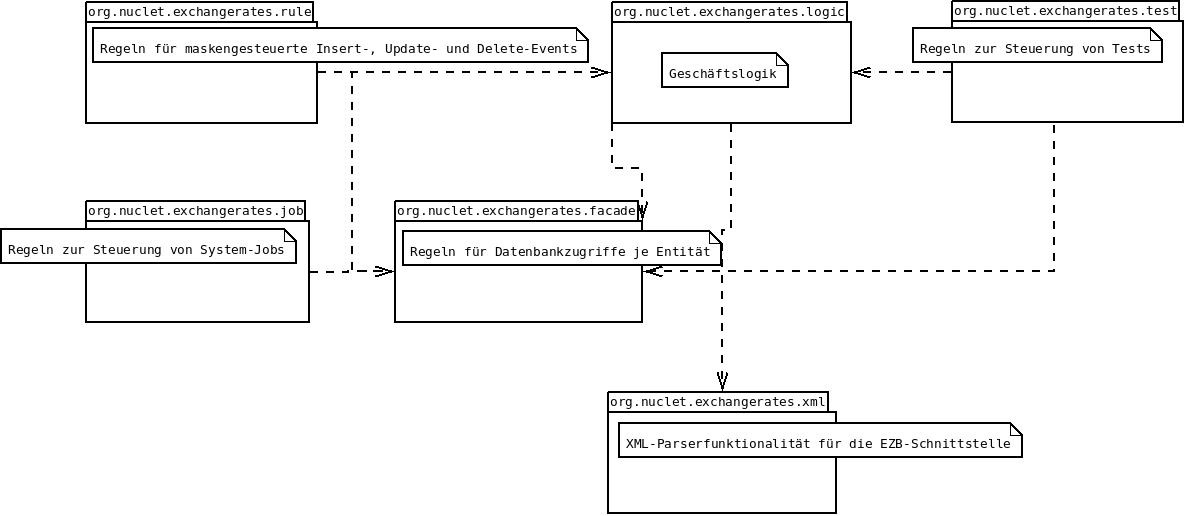
The Java rules are divided into seven packages:
Rules for form-controlled events (org.nuclet.exchangerates.rule)
Rules for controlling system jobs (org.nuclet.exchangerates.job)
Rules for the business logic (org.nuclet.exchangerates.logic)
Facade classes for executing database queries per entity (org.nuclet.exchangerates.facade)
Rules for reading in and processing MT940 files (org.nucletexchangerates.xml)
Rules for executing tests (org.nuclet.exchangerates.test)
The dependencies of the packages are illustrated in the following figure.
The exchange rates Nuclet is fully functional on the Java side. Here is an overview of the Java classes distributed across the individual packages:
Java package | Java class | Short description |
org.nucket.exchangerates.facade | AbstractCurrencyFacade | interface definition for database access to a currency business object |
| CurrencyFacade | concrete implementation for database access to a currency business object | |
| CurrencyFacadeFactory | factory class for the CurrencyFacade | |
ExchangeRateFacade | database access to the business object „Exchange Rate“ | |
org.nuclet.exchangerates.job | EcbExchangeRateImporter | importer class for the ECB interface |
EcbExchangeRatesJob | job for calling the ECB interface import | |
org.nuclet.exchangerates.logic | CurrencyConverterLogic | logic for currency conversions |
CurrencyLogic | validation logic for currencies | |
org.nuclet.exchangerates.rule | ConvertCurrencyAmount | conversion in the currency converter form |
ValidateBaseCurrency | validations regarding the existence of a base currency | |
SwapCurrencies | currency swap (base and target currency) in the currency converter form | |
org.nuclet.exchangerates.test | CurrencyConverterTest | test class for testing currency conversions |
CurrencyConverterTestJob | job for calling the test of currency conversions | |
| org.nuclet.exchangerates.wrapper | AbstractCurrencyWrapper | wrapper object for interface definition on a currency business object |
| CurrencyWrapper | concrete implementation of the wrapper object for currencies | |
org.nuclet.exchangerates.xml.sax | EcbExchangeRate | wrapper class for the import via the ECB interface |
EcbExchangeRateHandler | XML handler for the ECB interface |
Table 2: Java package structure
Application-specific adjustments should generally not be necessary in the Java rules.
The integration of the exchange rates Nuclet takes place in 10 steps:
Download
Nuclet import
Create object import
Run object import
Assignment of rules in the rule management
All integration steps are explained in detail below.
Step 1: Download
Download der ZIP-Datei „Exchange_Rates-v1.4.0_4.19.3.zip“ auf der Nuclos-Webpage unter „Nuclos Services“ > „Download“ > „Nuclet Download“. Das ZIP anschließend lokal entpacken.
Step 2: Nuclet import
Import des MT940-Nuclets unter „Konfiguration“ > „Nuclet Management“ > „Importieren“ in Ihre bestehende Nuclos-Instanz, Auswahl der Datei „Exchange_Rates-v1.4.0-4.19.3.nuclet“
During the import, the following four warnings will appear:
Der Grund dafür ist: Die Währungsbusinessobjekte als Referenzbusinessobjekt fehlt in den Businessobjekten "Wechselkurs" und "Währungsrechner". More on this in step 4. |
Step 3: Create a currency business object or import the Currency Nuclet
The prerequisite for the exchange rates Nuclet to function is the existence of a currency business object with the following mandatory fields:
| Attribute | Data type | Function | Implementation in the Currency Nuclet |
|---|---|---|---|
| ISO-4217-Code | Text | Identification of the currency via the three-digit currency code (see Wikipedia) | iso4217Code |
| Number of decimal places | Integer | the number of decimal places of the currency system determines the decimal places of the exchange rates | numberOfDigits |
| Base currency? | Yes/No | Definition of a system-unique base currency (here: EUR) | isBaseCurrency |
Das Währungsbusinessobjekt "Currency" im Currency-Nuclet genügt diesen Voraussetzungen.
The attributes do not have to be named as specified here. A matching data typing, however, is important. A mapping of the actually used attributes of the currency business objects from the target Nuclet to the interface attributes then takes place in step 8a). |
Step 4: Adjustments in the business object
Über das Businessobjekt muss dann die tatsächlich genutzte Währungsbusinessobjekte als Referenzbusinessobjekte in die Attribute "Basiswährung" und "Zielwährung" der beiden businessobjekten "Wechselkurs" und "Währungsrechner" eingetragen werden.
Step 5: Create object import
Steps 5 and 6 are only necessary if the supplied currencies are to be imported into the target system. However, the prerequisite for the function of the Nuclet is the existence of two currencies EUR and USD. |
Objektimport („Konfiguration“ > „Import & Export“) anlegen zur Strukturdefinition „Currency Converter“. Dazu kann die mitgelieferte CSV-Datei „Currency_Converter.csv“ (zu finden im Unterverzeichnis „data“ der ZIP-Datei) verwendet werden.
Step 6: Run object import
When the created object import is run, a currency converter object is created.
Caution: The prerequisite is the existence of the two currencies EUR and USD. |
Step 7: Assignment of rules in the rule management
Via the rule management, the Java rule ValidateBaseCurrency must be assigned to the actually used currency business object:
| Source Nuclet | Rule type | Rule | Target Nuclet | Business object |
|---|---|---|---|---|
| ExchangeRates | Aktualisieren | ValidateBaseCurrency | the Nuclet in which the currency business object you actually use is located | your own currency business object |
| ExchangeRates | Anlegen | ValidateBaseCurrency | the Nuclet in which the currency business object you actually use is located | your own currency business object |
| ExchangeRates | Löschen | ValidateBaseCurrency | the Nuclet in which the currency business object you actually use is located | your own currency business object |
Step 8: Adjustments in the Java rules
The exchange rates Nuclet works with any currency business object, therefore some adjustments in the Java rules must be carried out during an integration:
| Java package | Java rule | Short description | |
|---|---|---|---|
| a | org.nuclet.exchangerates.wrapper | CurrencyWrapper | Wrapper object for currencies, i.e. here an interface to the actually used currency business object is defined |
| b | org.nuclet.exchangerates.facade | CurrencyFacade | Definition of necessary database access to the actually used currency business object |
| c | org.nuclet.exchangerates.rule | ValidateBaseCurrency | Nutzung des in 8a) definierten Wrapper-Objekts, d.h. das Business-Objekt der Währungsbusinessobjekt aus dem RuleContext wird "gewrappt" |
a) CurrencyWrapper
The class CurrencyWrapper serves as a Nuclet interface to the actually used currency business object. The methods and the constructor of the class must be filled with application-specific behaviour. Examples are given in comment blocks; these examples must therefore be adapted during integration to the actually used currency business object (or its BusinessObject class).
package org.nuclet.exchangerates.wrapper;


import org.nuclos.api.businessobject.BusinessObject;

// @replace
//
// mit eigenem Code zu ersetzen, Beispiel:
//
// import org.nuclet.currency.Currency;


/**
 * Konkrete Wrapper-Klasse für Währungsobjekte
 *
 */
public class CurrencyWrapper extends AbstractCurrencyWrapper
{
    public CurrencyWrapper(final BusinessObject currency)
    {
        // @replace Bitte bei Nuclet-Integration mit eigenem Code ersetzen!
        //
        // Beispiel:
        //
        // if (currency instanceof Currency) {
        //    this.businessObject = currency;
        // }
    }

    /**
     * Liefert die Datenbank-ID des Währungsobjektes.
     */
    public Long getId()
    {
        return this.businessObject.getId();
    }

    /**
     * Liefert den ISO-4217-Code des Währungsobjektes.
     * @see https://de.wikipedia.org/wiki/ISO_4217
     * @see https://en.wikipedia.org/wiki/ISO_4217
     */
    public String getIso4217Code()
    {
        // @replace Bitte bei Nuclet-Integration mit eigenem Code ersetzen!
        //
        // Beispiel:
        //
        // return ((Currency)this.businessObject).getIso4217Code();

        return null;
    }

    /**
     * Liefert die Anzahl der Nachkommastellen im Währungssystem der Währung
     *
     * @return die Anzahl der Nachkommastellen im Währungssystem der Währung
     */
    public Integer getNumberOfDigits()
    {
        // @replace Bitte bei Nuclet-Integration mit eigenem Code ersetzen!
        //
        // Beispiel:
        //
        // return ((Currency)this.businessObject).getNumberOfDigits();

        return null;
    }

    /**
     * Yields information, if the currency is marked as "base currency"
     *
     * @return true, falls die Währungs als "base currency" markiert ist
     */
    public Boolean getIsBaseCurrency()
    {
        // @replace Bitte bei Nuclet-Integration mit eigenem Code ersetzen!
        //
        // Beispiel:
        //
        // return ((Currency)this.businessObject).getIsBaseCurrency();

        return null;
    }
} |
b) CurrencyFacade
In the class CurrencyFacade, the methods getBaseCurrencies() and getCurrencyByIso4217Code() must be filled with application-specific behaviour. An example is given in a comment block; this example must be adapted to the actually used currency business object (or its BusinessObject class).
package org.nuclet.exchangerates.facade;


import java.util.ArrayList;
import java.util.List;

import org.nuclos.api.businessobject.Query;
import org.nuclos.api.businessobject.QueryOperation;
import org.nuclos.api.businessobject.SearchExpression;
import org.nuclos.api.context.JobContext;
import org.nuclos.api.context.RuleContext;
import org.nuclos.api.exception.BusinessException;
import org.nuclos.api.provider.QueryProvider;
import org.nuclos.api.provider.BusinessObjectProvider;

import org.nuclet.exchangerates.wrapper.AbstractCurrencyWrapper;
import org.nuclet.exchangerates.wrapper.CurrencyWrapper;

// @replace! Bitte bei Nuclet-Integration mit eigenem Code ersetzen!
//
// Beispiel:
//
// import org.nuclet.currency.Currency;


/**
 * Facade for Business Objects of type "Currency"
 *
 */
public class CurrencyFacade extends AbstractCurrencyFacade
{
    public CurrencyFacade(final JobContext jobContext)
    {
        super(jobContext);
    }

    public CurrencyFacade(final RuleContext ruleContext)
    {
        super(ruleContext);
    }

    /**
     * Liefert die Singleton-Instanz dieser Klasse
     *
     */
    public static CurrencyFacade getInstance(final JobContext jobContext)
    {
        return new CurrencyFacade(jobContext);
    }

    public static CurrencyFacade getInstance(final RuleContext ruleContext)
    {
        return new CurrencyFacade(ruleContext);
    }

    /**
     * Fetches all currencies marked as "base currency" from the database and returns
     * a list of wrapped currency objects
     *
     * @return a list of wrapped currency objects
     */
    protected List<AbstractCurrencyWrapper> getBaseCurrencies() throws BusinessException
    {
        // @replace! Bitte bei Nuclet-Integration mit eigenem Code ersetzen!
        //
        // Beispiel:
        //
        // final Query<Currency> queryGetBaseCurrency = QueryProvider.create(Currency.class);
        // queryGetBaseCurrency.where(new SearchExpression(Currency.IsBaseCurrency, Boolean.TRUE, QueryOperation.EQUALS));
        //
        // final List<Currency> lstBaseCurrencies = QueryProvider.execute(queryGetBaseCurrency);
        // final List<AbstractCurrencyWrapper> lstWrappedBaseCurrencies = new ArrayList<AbstractCurrencyWrapper>();
        //
        // for (final Currency currency : lstBaseCurrencies) {
        //     lstWrappedBaseCurrencies.add(new CurrencyWrapper(currency));
        // }

        // return lstWrappedBaseCurrencies;

        return null;
    }

    /**
     * Fetches the currency which determined by a given ISO 4217 code from the database
     *
     * @param strIso4217Code the ISO 4217 code of the currency to be found
     *
     * @return the currency which is marked as "base currency" from the database
     * @throws BusinessException, if more than one currency-objects are found
     */
    public AbstractCurrencyWrapper getCurrencyByIso4217Code(final String strIso4217Code)
    {
        // @replace! Bitte bei Nuclet-Integration mit eigenem Code ersetzen!
        //
        // Beispiel:
        //
        //  final Query<Currency> queryGetCurrency = QueryProvider.create(Currency.class);
        //  queryGetCurrency.where(Currency.Iso4217Code.eq(strIso4217Code));
        //
        //  final List<Currency> listCurrency = QueryProvider.execute(queryGetCurrency);
        //
        //  if (listCurrency != null && listCurrency.size() > 0) {
        //     return new CurrencyWrapper(listCurrency.get(0));
        //  } else {
        //      return null;
        //  }

        return null;
    }


} |
c) ValidateBaseCurrency
In the rule ValidateBaseCurrency, the BusinessObject class of the actually used currency object must be entered.
package org.nuclet.exchangerates.rule;

import org.nuclos.api.rule.DeleteRule;
import org.nuclos.api.rule.InsertRule;
import org.nuclos.api.rule.UpdateRule;
import org.nuclos.api.context.DeleteContext;
import org.nuclos.api.context.InsertContext;
import org.nuclos.api.context.RuleContext;
import org.nuclos.api.context.UpdateContext;
import org.nuclos.api.annotation.Rule;
import org.nuclos.api.exception.BusinessException;
import org.nuclos.api.provider.BusinessObjectProvider;
import org.nuclos.api.provider.QueryProvider;

import org.nuclet.common.rule.AbstractRule;

import org.nuclet.exchangerates.logic.CurrencyLogic;
import org.nuclet.exchangerates.wrapper.AbstractCurrencyWrapper;
import org.nuclet.exchangerates.wrapper.CurrencyWrapper;

// @replace! Bitte bei Nuclet-Integration mit eigenem Code ersetzen!
//
// Beispiel:
//
// import org.nuclet.currency.Currency;

/**
 * @name ValidateBaseCurrency
 * @description Checks if exactly one base currency is declared
 * @usage
 * @change
 *
 *
 */
@Rule(name="ValidateBaseCurrency", description="Checks if exactly one base currency is declared")
public class ValidateBaseCurrency extends AbstractRule implements InsertRule, UpdateRule, DeleteRule
{
    public void insert(InsertContext context) throws BusinessException
    {
        // @replace Bitte bei Nuclet-Integration mit eigenem Code ersetzen!
        //
        // Beispiel:
        //
        // validateBaseCurrency(context, new CurrencyWrapper(context.getBusinessObject(Currency.class)));
    }

    public void update(UpdateContext context) throws BusinessException
    {
        // @replace Bitte bei Nuclet-Integration mit eigenem Code ersetzen!
        //
        // Beispiel:
        //
        // validateBaseCurrency(context, new CurrencyWrapper(context.getBusinessObject(Currency.class)));
    }

    public void delete(DeleteContext context) throws BusinessException
    {
        // @replace Bitte bei Nuclet-Integration mit eigenem Code ersetzen!
        //
        // Beispiel:
        //
        // validateBaseCurrency(context, new CurrencyWrapper(context.getBusinessObject(Currency.class)));
    }


    private void validateBaseCurrency(final RuleContext context,
        final AbstractCurrencyWrapper currency) throws BusinessException
    {
        initialize(context);

        final CurrencyLogic currencyLogic = new CurrencyLogic(context);
        currencyLogic.validateCurrency(currency);
    }
} |
Step 9: Layout adjustments
Im Layout "Currency" können Sie die Wechselkurse als Unterformular einbinden.
Step 10: read in current exchange rates
Via the job ECB Exchange Rates the currently valid exchange rates can now be read in. Only those currencies that are present in the system are taken into account.
Setting up the job control
Öffnen der Jobsteuerung „ECB Exchange Rates“ unter „Administration“ > „Jobsteuerung“
Configure start date, start time, interval, e-mail notification and options for deleting the log info.
Activate the job control if the job is to be run automatically at the configured interval. Alternatively, the job can also be run manually via the job control.
Operation
The imported data is stored in the business object for exchange rates („Exchange Rate“).
The forms for currencies and exchange rates can be found under the menu item „Wechselkurse“. This can be changed at any time via the business object.
The currency converter can also be found under the menu item „Wechselkurse“. If you do not want to use it, you can remove it from the menu via the business object.
The Nuclet is currently set up so that all exchange rates are displayed in the base currency of the system. Since the update runs via the ECB interface, the Euro (EUR) is stored as the base currency. You can also easily set up the Nuclet so that the exchange rate to the Euro is displayed in each currency: to do so, open the layout „Currency“ and change the entered value in the field „Fremdschlüssel“ (subform „Exchange Rates“) from „baseCurrency“ to „counterCurrency“.
Setting up user permissions (optional)
Access rights for existing user groups to layouts, business objects, attributes and attribute groups can be set in Nuclos in the usual three ways (see https://wiki.nuclos.de):
general settings for business objects under "Administration" > "User groups"
status-dependent settings for attributes/attribute groups under "Configuration" > "State model"
record-specific settings under "Configuration" > "Data sources" > "Record sharing"
The currency converter form is available for simple tests of currency conversions.
For advanced tests of currency conversions, please use the class org.nuclet.currency.test.CurrencyConverterTest. You are welcome to adapt and extend it to your own needs. The class is called by org.nuclet.currency.test.CurrencyConverterTestJob, and this can be run via the job control „Currency Converter Test“ as needed (preferably manually).
| Version | Date | Type | Changes |
|---|---|---|---|
| 1.0.0 | 12.08.2013 | initial version | Separation of exchange rate functionality and currency business object from the Currency Nuclet |
| 1.0.1 | 08.10.2013 | Bug fixes and enhancements | see Release Notes |
| 1.1.0 | 08.01.2014 | Migration to Nuclos 4.0 | Migration to Nuclos 4.0 |
| 1.2.0 | 25.03.2017 | Migration to Nuclos 4.13 | Migration to Nuclos 4.13 |
| 1.3.0 | 08.08.2017 | Migration to Nuclos 4.18 | Migration to Nuclos 4.18 |
| 1.4.0 | 13.09.2017 | Migration to Nuclos 4.19 | Migration to Nuclos 4.19 |