Duplicate search Nuclet – nuclet: duplicate search. |
Language: Deutsch · English
Data sheet and documentation entry point for the Duplicate search Nuclet (detects duplicates when creating data, incl. phonetic search and replacement rules).
On this page |
This page was machine-translated from German as a first draft and is currently under review. The authoritative source remains the German original (see the language switch above). |
| Version | Date | Notes | Compatibility |
|---|---|---|---|
| 1.0.0 | 07.03.2018 | First published version | from Nuclos 4.25.2 |
The "Duplicate search" Nuclet offers the ability to detect duplicates when creating data and to notify the user about them. Both the individual definition of replacement rules and phonetic search are supported.
The integration after a successful Nuclet import (see Nuclet import) is to be carried out as follows.
| Step | Description |
|---|---|
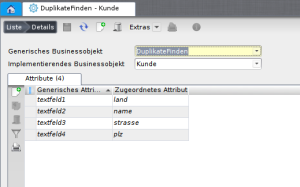
| 1 | Please assign your business objects for which you would like to receive a warning message to the generic business object "Duplicate search" of the "Duplicate search" Nuclet under Configuration | Rule sets | Generic implementation. Then the attributes used to search for duplicates must be linked to the attributes Textfeld1..10 of the generic business object. A duplicate generally exists when all linked fields are pairwise identical or at least one of the fields is empty. See also Generic implementation.
|
| 2 | Then assign the rule "Duplikatwarnung" of the "Duplicate search" Nuclet to the corresponding business objects. Since the rule can be executed both when creating and when modifying a business object, two links must be created as needed. See also Server rule manager.
|
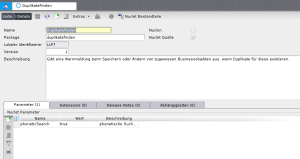
| 3 | You can decide whether the duplicate search should be carried out with a phonetic algorithm. This also detects words that are spelled similarly, as well as minor typos. The algorithm is to be activated under the menu item Configuration | Nuclet Management in the Nuclet "Duplicate search" with the Nuclet parameter PhoneticSearch. (true / false)
|
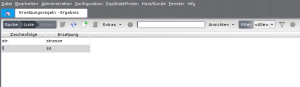
4 | Furthermore, under the menu item Administration | Replacement rules you have the option to specify individual replacement rules that are taken into account in the duplicate search. These are particularly useful if you do not want to use the phonetic search (3.).
|