
Language: Deutsch · English
 Open links to local files
How to open links to local files from the Web Client (Windows + Firefox).
HOW-TO ADMIN / OPERATIONS UPDATED: JUL 2026 APPLIES TO NUCLOS 4.2026.X
On this page
The Web Client can open links via hyperlink fields. For security reasons modern browsers block links to local files (file protocol). Below is the setup for Windows + Firefox.
Example
Example: c:\Users\foo\bar.csv is opened as file:///c:/Users/foo/bar.csv.
Firefox security settings
In the profile directory (%appdata%\Mozilla\Firefox\Profiles\{profileId}) create or extend user.js:
user_pref("capability.policy.policynames", "localfilelinks");
// mit Leerzeichen getrennte Liste der Hosts (mit Port)
user_pref("capability.policy.localfilelinks.sites", "http://localhost:8120");
user_pref("capability.policy.localfilelinks.checkloaduri.enabled", "allAccess");
// schaltet den Firefox-eigenen Handler fuer das Protokoll "file" aus
user_pref("network.protocol-handler.expose.file", false);
Choose the default program
On the first click of a file link, Firefox asks for a program – choose Windows Explorer (c:\Windows\explorer.exe) and enable „Remember my choice for file links“.
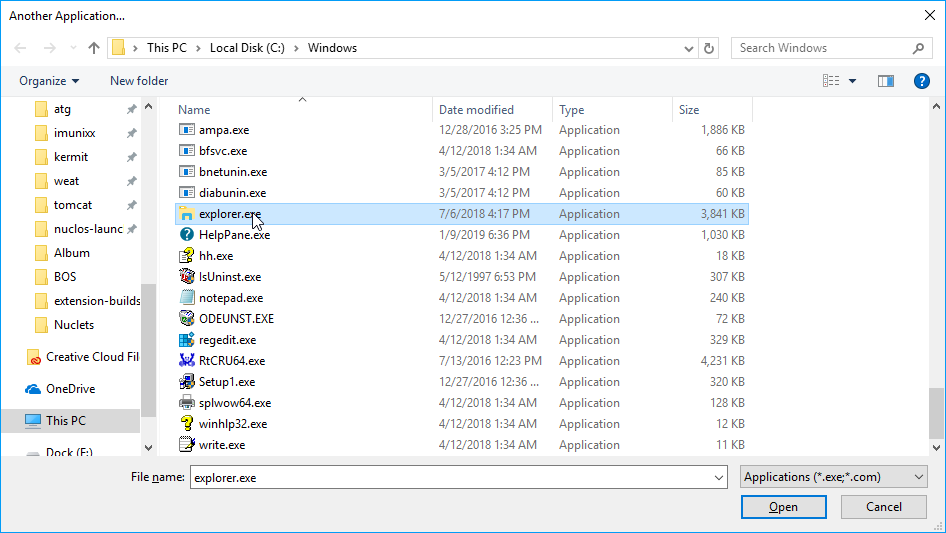
Program selection in Firefox.
Afterwards each click on a local link opens Explorer directly.
Related pages
Überblick
Inhalte