
Language: Deutsch · English
 Embedding a planning board in a layout
Embed a planning board in a BO layout (web client only) – configure the resource foreign key and date interval.
HOW-TO APPLICATION DEVELOPER UPDATED: JUL 2026 APPLIES TO NUCLOS 4.2026.X
On this page
A planning board can be embedded directly into the layout of a business object. Basic knowledge of planning board configuration is assumed.
Web client only
Embedding is supported only in the web client. In the rich client the spot in the layout stays empty.
Configure the planning board element
The configuration is similar to a subform: a foreign key points from the resource BO to the layout BO and determines which resources are shown for the respective record.
- Choose the planning board in the Planning board dropdown.
- Under resource foreign key select the reference from the resource BO to the layout BO.
- Define the date interval – in two ways:
| Variant | Description |
|---|---|
| Relative date function | computes a date relative to when the board is opened. |
| Date field | reads the value from a date field of the layout BO. |
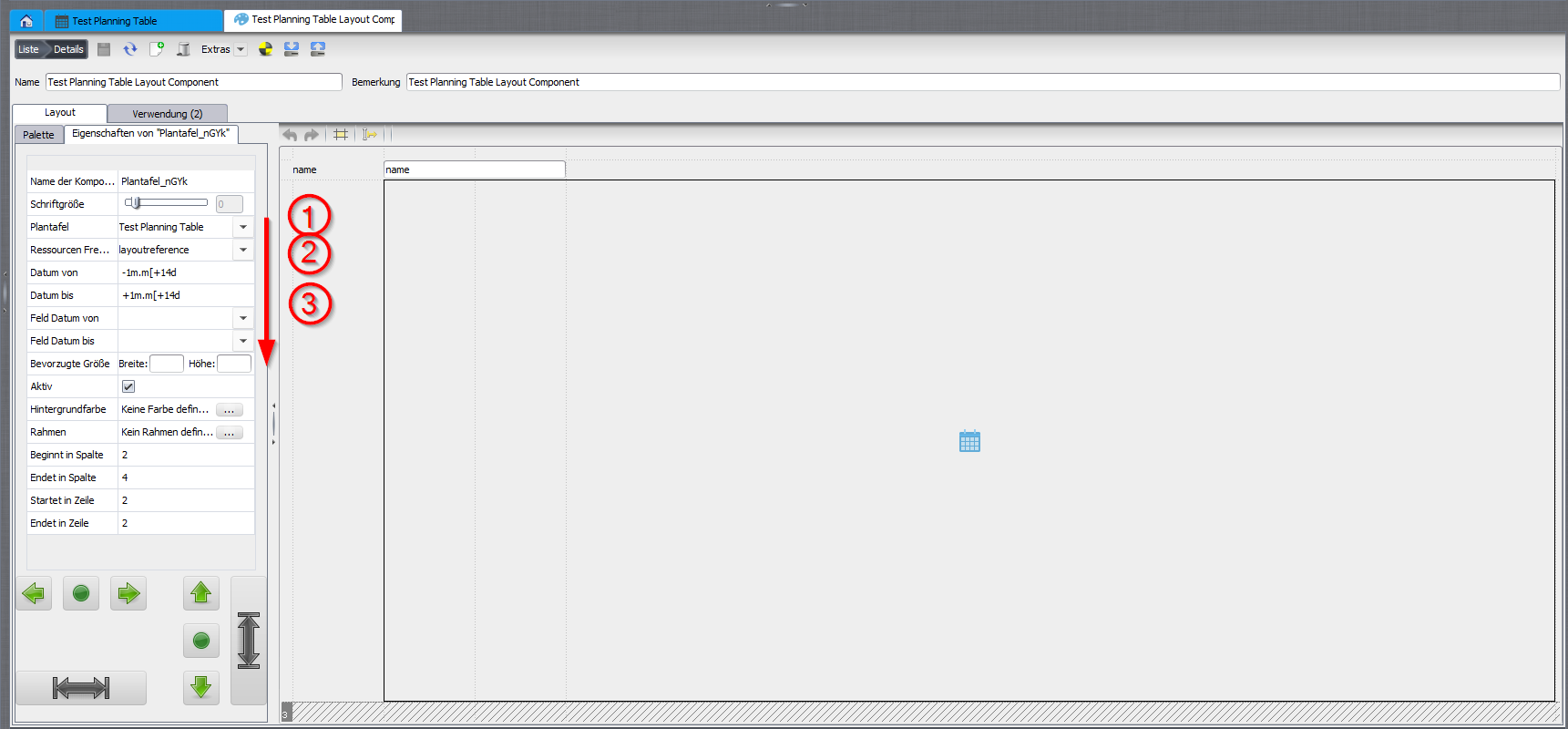
Configuring the planning board layout element.
Precedence
Entries for field date from/to – if not empty – are preferred over relative values. The from-time must be ≤ the to-time.
Usage
After saving, the layout can be opened in the web client to verify the configuration.
Related pages
Überblick
Inhalte