| Auszug |
|---|
|
Nuclos standalone client: run the Rich Client without Web Start, configure it in the installer (server host, Java runtime) and distribute it as a copyable directory. |
 Language: Deutsch · English
 Standalone client
The standalone client starts the Rich Client without Web Start – as a copyable directory with a start script.
| Status |
|---|
| colour | Green |
|---|
| title | Updated: Jul 2026 |
|---|
|
| Status |
|---|
| colour | Grey |
|---|
| title | applies to Nuclos 4.2026.x |
|---|
|
Since Nuclos 4.8 you can install a standalone client that runs Nuclos without Web Start.
Configuration in the installer
The "client configuration" step has two optional parameters:
- Server host – if left empty,
localhost is used (client then only usable on the server). - Java runtime – if given, it is bundled; otherwise a system runtime is used. Without a system runtime this is required.
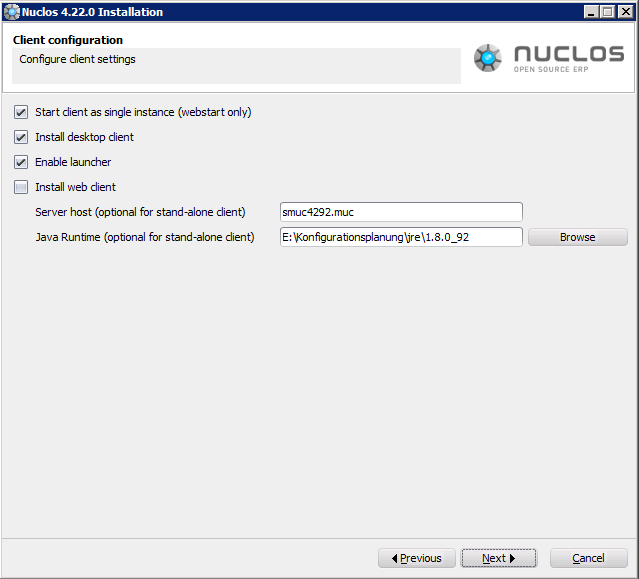
Client configuration in the installer (server host, Java runtime).
Start & distribution
Under client in the install directory you'll find everything including start scripts: nuclos.cmd (Windows) / nuclos.sh (Unix). On first start the all-in-one nuclos.jar is unpacked and the client starts. The whole directory can be copied to other machines.
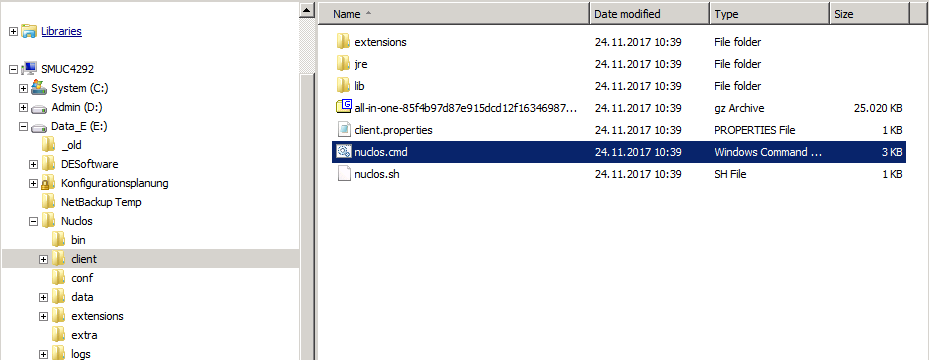
The client directory with start scripts.
| Info |
|---|
|
Before Nuclos 4.8 the client directory was created but the start scripts were missing – you can take these from a 4.8+ version. |
Related pages
 Launcher (DE)
Start the Rich Client via the Launcher.
Open →
 Installation (DE)
Install Nuclos.
Open →
