
Seitenhistorie
...
| Step | Description |
|---|---|
| 1 | If you have not already done so, activate multilingualism in your current system (see topic Datensprache), if applicable only with the primary language "German (DE)" |
| 2 | Import the Nuclet into your Nuclos system (see topic Nuclet Importimport) |
| 3 | Run the job "Initialisiere Nuclet Handel"; this creates technically necessary data such as number ranges, form field labels and stock movement types. |
| 4 | Create a new record under Master data > Organisation and fill it with the existing data of your company |
| 5 | For a quicker start into development or testing, you can have the job "Erzeuge BeispieldatenCreate sample data" generate some sample data (organisation, employees, customers, articles, ...). |
| 6 | Adjust the Nuclet parameters in the base Nuclet if needed |
| 7 | If you want to use email sending, please create and fill the Systemparameter für den Mailversand and activate the created email templates. |
| 8 | If you want to use the DATEV export, please note points 4.4 and 4.6 of the DATEV-Integration |
| 9 | If you want to use SEPA, please adjust the Nucletparameter für SEPA in the SEPA Nuclet |
| 10 | If you want to use CAMT import, please adjust the Nuclet parameters in the CAMT Nuclet |
...
Employees
- It saves a little work if you first create the Benutzer and then the employee. If you then specify the associated user in the employee, the data entered in the user (name, first name, ...) is automatically transferred to the employee. Assigning employees to users is not mandatory, but helpful (see below)
- Roles can be assigned to an employee. These roles control in which BOs this employee is available for selection as an editor. For this to work, the names of the roles must not be changed, or the parameters for the Valuelist Provider Value list provider must then be adjusted in the affected layouts.
- Order management => quotation, sales order
- Accounting => outgoing invoice, credit note
- Procurement => purchase order, incoming invoice
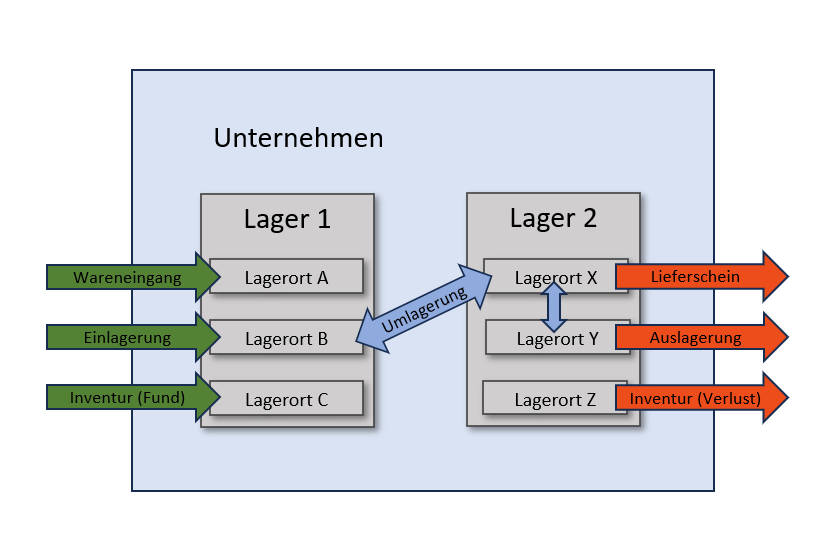
- Warehousing => stock-in, stock transfer, stock-out, stock inventory
- Goods issue => delivery note
- If an employee is assigned to a user, and this employee is active and has e.g. the role "Auftragswesen", the field editor is automatically filled with the current employee when they create a quotation or sales order. The same applies analogously to other roles.
...
Documents
- Documents are e.g. sales orders, delivery notes, outgoing invoices, credit notes, purchase orders or incoming invoices. They are all structured quite similarly
- All documents follow their own state models with firmly defined state changes (see Statusmodell Status model).
- Documents should not be deleted, but rather transferred to the status Storniert (if possible), so that e.g. stock reservations that have been made are cleanly rolled back.
- A document contains information about the customer, addresses, contacts and language; with appropriate customer configuration, these are filled automatically after selecting the customer
- The language determines the language in print forms and emails
- The editor is filled automatically with appropriate configuration (see topic Employees)
- The VAT rate is determined automatically based on the country group of the country of the delivery address.
- The actual tax rate is derived from the VAT rate and the quotation date VAT [%] automatisch ermittelt
- A discount can be specified for the entire document and for individual items
- On the topic of Text blocks and Remarks (internal) see topic Print outputs
Quotation
- For general properties see topic Documents
- A sales order is automatically generated from an accepted quotation. Further sales orders can be generated via the object generator.
- The job Setze alte Angebote auf Abgelaufen Set old quotations to Expired sets quotations in the status Offen to the status AbgelaufenExpired, when the date Gültig bis erreicht wurde Valid until was reached
- The date Gültig bis Valid until on the state change to Offen from the current date and the Nuclet parameter Gültigkeitsdauer von Bestellvorschlägen Validity period of purchase requisitions is calculated.
Sales order
- For general properties see topic Documents
- It can be created from a quotation or created directly
- Delivery notes and invoices can be created from a sales order via the object generator
- As soon as a sales order reaches the status Bestätigt Confirmed the required material is reserved and is no longer available for other sales orders
Delivery note
- For general properties see topic Documents
- It ensures the articles are booked out of the warehouse
Outgoing invoice
- For general properties see topic Documents
- The job Setze alte Ausgangsrechnungen auf Überfällig Set old outgoing invoices to Overdue sets outgoing invoices in the status Offen to the status Überfällig Overdue, when the date Fällig am Due on has been reached.
- The date Fällig am Due on on the state change to Offen is calculated from the current date and the payment term.
...
Purchase requisition
- For each stock level record, a minimum stock level and a reorder quantity can be defined
- If (stock - reserved + ordered) < minimum stock, the job Erzeuge Bestellvorschläge Create purchase requisitions automatically creates a purchase requisition with the specified reorder quantity for this article and the default supplier
- The job Setze alte Bestellvorschläge auf Abgelaufen Set old purchase requisitions to Expired sets purchase requisitions in the status Entwurf after x days (Nuclet parameter Gültigkeitsdauer von Angeboten Validity period of quotations) to the status AbgelaufenExpired
- From a purchase requisition in the status Freigegeben a purchase order can be generated.
Purchase order
- For general properties see topic Documents
- It can be created manually or generated from a purchase requisition.
- For each purchase order item, goods receipts can be created until each item has been delivered.
- Goods receipts increase the stock level
- The job Setze alte Bestellungen auf Überfällig Set old purchase orders to Overdue sets purchase orders in the status BestelltOrdered to the status ÜberfälligOverdue, when the date Fällig am erreicht wurde Due on was reached
- The date Fällig am Due on on the state change to Bestellt from the current date and the Nuclet parameter Fälligkeit Bestellungen Due date of purchase orders is calculated.
- Incoming invoice
- For general properties see topic Documents
- An incoming invoice primarily serves to record the data of an invoice received for a purchase order
- It has no further influence on other BOs
warehouse management
|
|
...
- If authorised, many BOs offer object generators (selection Objektgenerator Object generator in the detail view of the BOs). Here you can e.g. create a sales order from a customer or a quotation, or a purchase order from a purchase requisition or a supplier.
- If certain data of a value list is already used in other BOs (e.g. a delivery term in sales orders), then it can no longer be deleted. However, you can remove the flag "Aktiv" in the corresponding delivery term. This means the delivery term is no longer offered in the selection in sales orders in the future. This option exists for all value lists.
- Many BOs offer the option, in a tab Document attachment to store documents/files for this BO. Document attachments are not stored in the database but in the folder <NUCLOS-HOME>/data/documents. Therefore this folder should be part of the backup.
- If a BO has a Reference to another BO, e.g. a sales order has a reference to a customer, you can conversely look in the customer to see which sales orders exist for that customer. The sales orders are only displayed there and cannot be edited.
...
- Number ranges determine how numbered BOs should be numbered
- See Nuclet: Number ranges
email sending
- See Nuclet: E-Mail-VersandEmail sending
- Email sending is possible via so-called email templates. These allow the administrator to configure the emails to be sent and to change them during operation.
- To send emails, an email server must be specified in the system parameters (see Parameter für Mailversand) and the templates activated if necessary.
- The job "Erzeuge BeispieldatenCreate sample data" creates some sample templates (initially inactive)
- Order confirmation to customer - is sent to the customer's contact when the sales order goes into the status Bestätigt Confirmed wechselt
- Invoice to customer - is sent to the customer's contact when the invoice goes into the status Offen wechselt
- Purchase order to supplier - is sent to the supplier's contact when the purchase order goes into the status Bestellt Ordered wechselt
- The email log contains all sent, yet-to-be-sent and received emails
...
Nuclet parameters
| Name | Function | Example |
|---|---|---|
| BestandsprüfungStock check | On every change to the stock level, it is checked whether the current stock equals the sum of the stock movements. This can be helpful to find errors in warehouse management early, but over time can also lead to poor performance. | true / false |
| Default Format Datum | Date format used in forms when it cannot be determined from the data | dd.MM.yyyy |
| Default Format Zahl | Locale used for the number format in forms when it cannot be determined from the data | DE |
| Defaultsprache | Language used in forms when it cannot be determined from the data | de_DE |
| Eigene USt-IdNr. | Your own VAT ID no. | 123456890Fälligkeit Bestellungen |
| Due date of purchase orders | Number of days after which purchase orders receive the status "ÜberfälligOverdue" (job "Setze alte Bestellungen auf ÜberfälligSet old purchase orders to Overdue") | 14Gültigkeitsdauer von Angeboten |
| Validity period of quotations | Number of days after which quotations receive the status "AbgelaufenExpired" (job "Setze alte Angebote auf AbgelaufenSet old quotations to Expired") | 42Gültigkeitsdauer von Bestellvorschlägen |
| Validity period of purchase requisitions | Number of days after which purchase requisitions receive the status "AbgelaufenExpired" (job "Setze alte Bestellvorschläge auf AbgelaufenSet old purchase requisitions to Expired") | 13Prüfe Lagerbestand Bestand |
| Check stock level In stock | On every change to the stock level, it is checked whether the current stock equals the sum of the stock movements. This can be helpful to find errors in warehouse management early, but over time can also lead to poor performance. | true / false Prüfe |
| Lagerbestand BestelltCheck stock level Ordered | On every change to the stock level, it is checked whether the ordered quantity equals the sum of the stock movements. | true / false Prüfe |
| Lagerbestand ReserviertCheck stock level Reserved | On every change to the stock level, it is checked whether the reserved quantity equals the sum of the stock movements. | true / false |
| ÜberreservierungOver-reservation | Allows reserving larger quantities than are actually available in the warehouse. | true / false |
| Validiere LagerbeständeValidate stock levels | On every change to the stock level, it is checked whether the current stock record is valid (quantities < 0, batch and serial number present if necessary, ...) This can be helpful to find errors in warehouse management early. | true / false |
...
Name | Function | Cycle |
|---|---|---|
Empfange Emails | Reads emails from the email account specified under Administration > Parameters and saves them in the email log. | RegularlyErzeuge Beispieldaten |
Create sample data | Creates sample data (articles, customers, warehouses, …) for a quick start into development and testing. | OnceErzeuge Bestellvorschläge |
Create purchase requisitions | Creates purchase requisitions when minimum stock levels are undercut | Regularly |
Initialisiere Nuclet Emailversand | Creates the data necessary for email sending | Once |
Initialisiere Nuclet Handel | Creates the data technically necessary for the trade Nuclet (e.g. stock movement types, form fields, tax rates …). | OnceSetze alte Angebote auf Abgelaufen |
Set old quotations to Expired | Automatically sets expired quotations to the status "AbgelaufenExpired" (Nuclet parameter "Gültigkeitsdauer von AngebotenValidity period of quotations") | RegularlySetze alte Ausgangsrechnungen auf Überfällig |
Set old outgoing invoices to Overdue | Automatically sets overdue invoices to the status "ÜberfälligOverdue" ("Anzahl TageNumber of days" in the payment term) | RegularlySetze alte Bestellungen auf Überfällig |
Set old purchase orders to Overdue | Automatically sets overdue purchase orders to the status "ÜberfälligOverdue" (Nuclet parameter "Fälligkeit BestellungenDue date of purchase orders") | RegularlySetze alte Bestellvorschläge auf Abgelaufen |
Set old purchase requisitions to Expired | Automatically sets expired purchase requisitions to the status "AbgelaufenExpired" (Nuclet parameter "Gültigkeitsdauer von BestellvorschlägenValidity period of purchase requisitions") | RegularlyValidiere E-Mail-Templates |
Validate email templates | Validates all email templates | As needed |
Versende Emails | Sends all emails in the email log that are earmarked for sending (Nuclet parameter "Email sofort versenden" = "N") | Regularly |
Versende Erinnerungen | Sends recurring reminder emails | Regularly |
...
Überblick
Inhalte