| Auszug |
|---|
|
Nuclos print profile: output format, rule entry point, printer spooling, PrintResult, FIFO, dispatching, document management. |
 Language: Deutsch · English
 Print profile
Control the print process – output formats, rule entry points and FIFO printer spooling.
| Status |
|---|
| colour | Green |
|---|
| title | Updated: Jul 2026 |
|---|
|
| Status |
|---|
| colour | Grey |
|---|
| title | applies to Nuclos 4.2026.x |
|---|
|
Print profiles bundle the output formats offered when printing and can be configured individually by the user. Two additional rule entry points allow influencing the print process.
Influence via rules
- Tailor the print profiles and output formats offered to the user on Print depending on the record.
- Post-process documents printed by the user (e.g. hand them to a document management system).
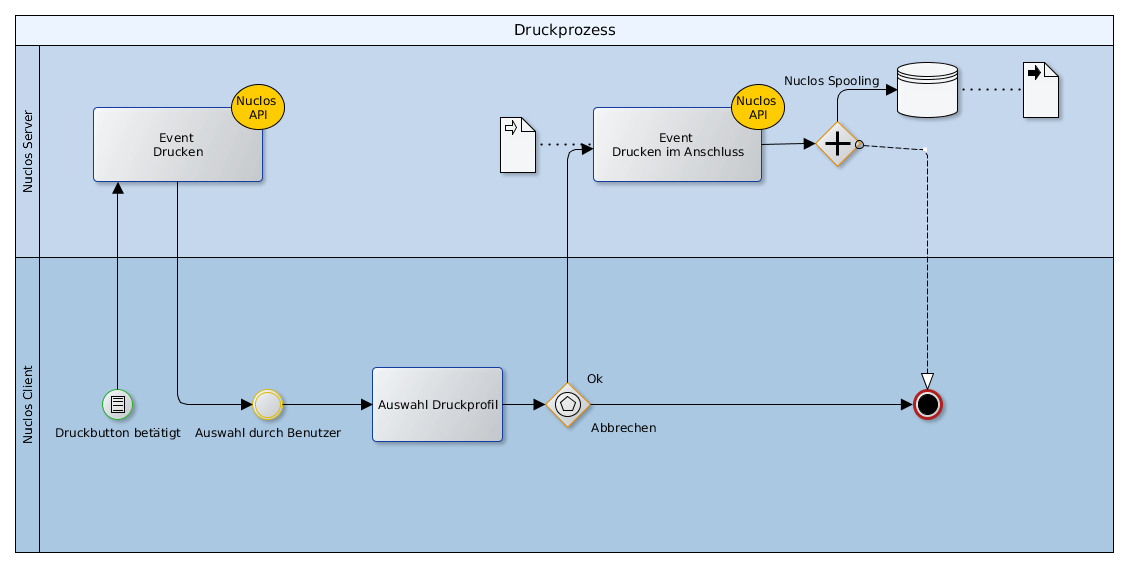
Print flow with rule entry points
Printer spooling
Nuclos manages print jobs via its own spooling: each printer has a worker with a list of PrintResult objects processed in insertion order (FIFO).
| Info |
|---|
|
Example: a user selects five documents – three for the label printer, two for the standard printer. The server groups the jobs by target printer (dispatching) and passes them to the respective worker as a batch. This way a large print job does not block the entire spooling. |
Related pages
 Print service
Output targets.
Open →
