| Auszug |
|---|
|
Nuclos PostgreSQL backup pgAdmin: schema backup, *.backup, GUI, dump. |
 Language: Deutsch · English
 Create a Postgres backup
PostgreSQL backup via pgAdmin (GUI) – back up the schema via right-click.
| Status |
|---|
| colour | Blue |
|---|
| title | Administrator |
|---|
|
| Status |
|---|
| colour | Green |
|---|
| title | Updated: Jul 2026 |
|---|
|
| Status |
|---|
| colour | Grey |
|---|
| title | applies to Nuclos 4.2026.x |
|---|
|
Alternatively a PostgreSQL dump can be created graphically via pgAdmin.
Step by step
- Open pgAdmin.
- Right-click the schema and choose Backup….
- Save the dump to a target directory with the extension
*.backup.
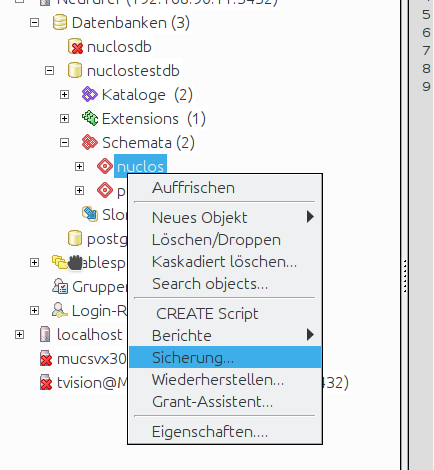
pgAdmin: back up the schema.
Related pages
 Postgres backup via console/script
Console.
Open →
