| Auszug |
|---|
|
Nuclos memory image: heap dump, thread dump, jvisualvm, JDK, JMX, OutOfMemoryException, post-mortem, Tomcat. |
 Language: Deutsch · English
 Creating a memory image of Nuclos
Create heap and thread dumps with jvisualvm – to analyse memory leaks, freezes and for support.
| Status |
|---|
| colour | Blue |
|---|
| title | Administrator |
|---|
|
| Status |
|---|
| colour | Green |
|---|
| title | Updated: Jul 2026 |
|---|
|
| Status |
|---|
| colour | Grey |
|---|
| title | applies to Nuclos 4.2026.x |
|---|
|
A memory image (heap/thread dump) helps analyse memory leaks, freezes and crashes as well as profiling. It can be created from both the Nuclos client and server.
| Info |
|---|
|
A post-mortem image can often still be created even after OutOfMemoryExceptions have been thrown. Always try this before restarting Nuclos. |
| Warnung |
|---|
|
A memory image contains confidential data from your application. Only share it with trusted people and encrypt it for transport if needed. |
Prerequisite
You need a JDK (not a JRE!) on the relevant system. If the server runs as a Windows service, the Tomcat JVM must be started with matching JMX parameters (see Tomcat administration). Newer installers allow specifying a JMX port in development mode.
Memory image with jvisualvm
- Start
bin/jvisualvm (or .exe) from the JDK. - On the left under Applications, right-click the JVM instance – the server appears as Tomcat, the client as Java Web Start.
- Create a Thread Dump and a Heap Dump one after another and save each as a file.
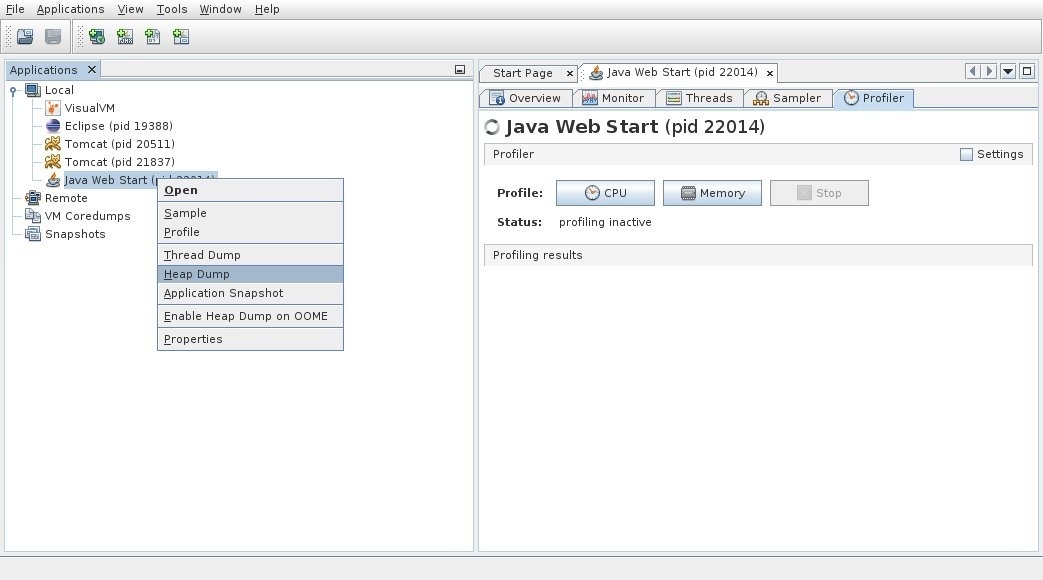
jvisualvm: create thread and heap dump.
| Hinweis |
|---|
|
If the server runs as a Windows service it is not directly visible here: run it in development mode and connect via right-click on Local → Add JMX Connection… → localhost:<JMX port>. |
Related pages
 Tomcat administration
JMX/Tomcat.
Open →
