
Seitenhistorie
...
| Step | Description |
|---|---|
| 1 | Create status model for reconciliation object create Due to current restrictions when using integration points, the reference object for the payment reconciliation must have a status model even if the automatic status change is not used. It is sufficient to set the "State model" flag in the BO editor and a simple state model (one status and a transition from the start point) anzulegen to the reference object. |
| 2 | Configure integration point for reconciliation object In this step, the business object for the payment reconciliation is configured. The following fields must be assigned: Currency (reference field): the reconciliation object must have a reference to the existing or newly created BO currency (see above). Amount (decimal number): the amount to be settled. Open amount or Amount paid (decimal numbers): on successful assignment, the amount from a transaction is recorded here.
Payment date actual (date): is set when the amount is settled. Comparison fields (text): up to five text fields from the reconciliation object can be selected for defining the reconciliation rules (see step 3). Paid (yes/no field): indicates whether the amount of the reconciliation object has been settled by the last transaction. If yes, the object is no longer Caution: If reconciliation objects are not marked as paid/open by a status model, this field is necessary! Reference additional reconciliation object (reference field): additional BO referenced by the reconciliation object for use in reconciliation rules (e.g. invoice → customer), selection takes place in step 3. Amount inverted (yes/no field): if this field is set in the target object, the sign of the amount from the transaction is reversed during reconciliation. Useful for objects such as credit notes whose amount is positive but which are reconciled with debit transactions. |
| 3 | Configure integration point for additional reconciliation object (optional) Comparison fields (text): analogous to step 2, up to five text fields can be selected for defining the reconciliation rules (see step 3). |
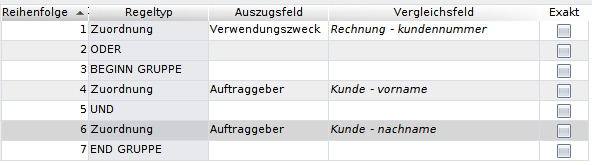
| 4 | Define rules for payment reconciliation Under the menu item CAMT/Payment reconciliation definition you can define rules for the assignment of transactions. Such a definition is used for carrying out a payment reconciliation, but you can also create multiple definitions and use them as needed. Name: A name for the definition. Credit/debit: Selection of whether credit, debit or all transactions of an account statement are to be compared. Assignment rulen : Rules that are used for the reconciliation. Each rule can have multiple entries in which a field from the account statement (statement field) is assigned to a comparison field configured in step 2 or 3. These entries can be linked with AND- or OR-operators. Each linking of two or more assignments forms a group, whereby only one of the operators can be used within each group. To use both operators in one rule, groups of AND and OR links must be enclosed with the entries BEGINN GRUPPE and END GRUPPE, which act as brackets. Example: assignment of an invoice by customer number or first and last name
If the selection Exakt is set, only an exact match is counted as a hit; otherwise, upper and lower case as well as spaces at the end and beginning are ignored and it is additionally checked whether one of the fields is contained in the other. Strings consisting of 3 or fewer characters are skipped in this last step. For each rule, it can be selected whether a hit leads to the immediate assignment of the transaction. This only happens if the hit for this rule is unique (and other rules with immediate assignment also find no other hits). The following fields from the account statement are currently available for the reconciliation:
Perform status change: Indicates whether a status change should be performed on successful assignment. If yes, the Target status must not be empty. Valid source status: Only reconciliation objects with a status specified here are included in the payment reconciliation. Target status: Target status for the automatic status change. Attention: in the Status model of the reconciliation object, an (automatic) status change to the target status must be enabled for each valid source status. Perform status change: Return status for using the function Reset assignment in the payment reconciliation (see further below). The corresponding status change must be enabled by the status model. Filter bank transactions: Here, bank transactions (transaction types) can be selected in order to exclude all transactions of the type from the payment reconciliation. Each transaction from an account statement is assigned such a type; the list of all types can be found under CAMT/Master data/Transaction type. |
...
Überblick
Inhalte